
PlayinMatch payout desk · IMPS to your own bank
PlayinMatch Withdrawal Time — Reliable IMPS Payout to Withdraw in 90 Minutes
Withdraw from PlayinMatch by asking for ₹1,000 or more to a bank account held in your own name, and the IMPS transfer normally reaches you 45 to 90 minutes later. Three requests are allowed each day. Anything sent after 11 PM sits until the next morning.
Reliable PlayinMatch Withdrawal Time Starts the Moment You Sign In
No payout clock runs until you are inside the PlayinMatch ID that actually holds the balance.
Four checks before you press withdraw
Balance at ₹1,000 or above.
Bank account in the same name as the ID.
Fewer than 3 requests used today.
Clock still short of 11 PM.
How Long Does a PlayinMatch Withdrawal Take? The Clear IMPS Receipt
Plan on 45 to 90 minutes. That is the gap between tapping submit on a PlayinMatch withdrawal and seeing the IMPS credit in your bank, and it applies only to a request of ₹1,000 or larger, headed for an account in your own name, that reaches the desk before 11 PM.
Those three conditions do nearly all the work. Miss one of them and the clock you are staring at is not the real clock.
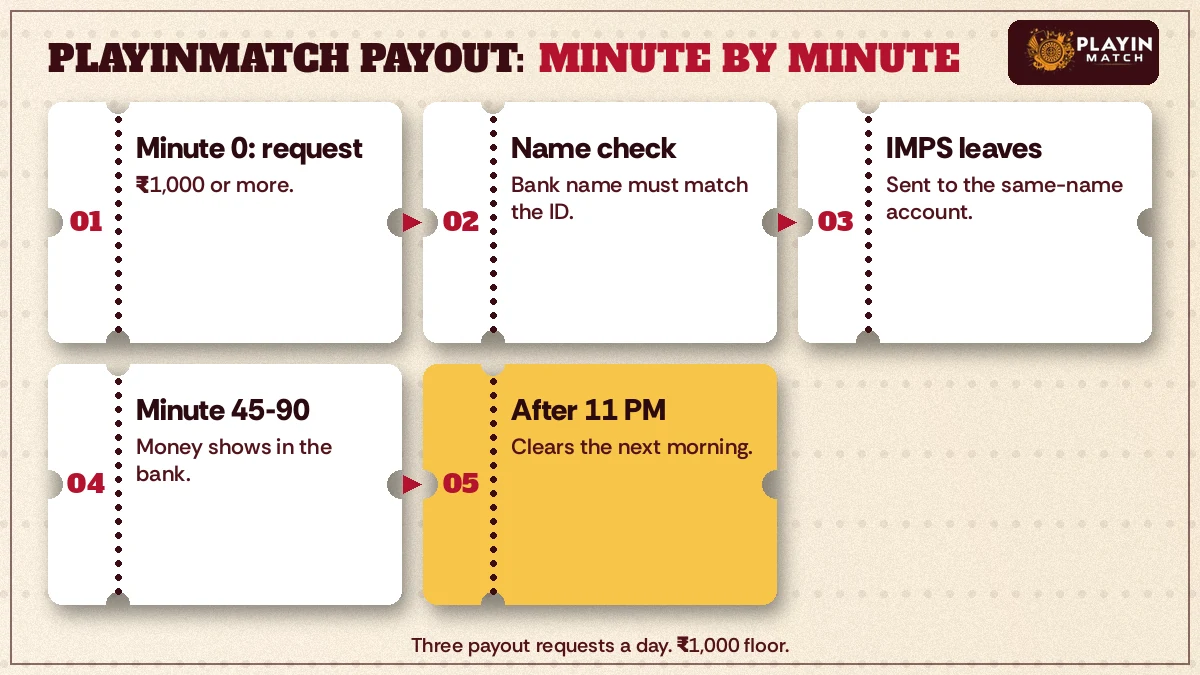
Below is the whole journey written out like a box-office receipt, one line per stage. It is roughly how a PlayinMatch payout moves on an ordinary evening.
- Minute 0 · request sent
- You submit an amount of at least ₹1,000 from your PlayinMatch wallet. This timestamp is the one that counts, not the time you opened the app or the time you finished your last bet.
- Name check
- PlayinMatch pays only into a bank account in the same name as the ID. If the names do not match, the request stops here, and waiting longer will not change that.
- IMPS leaves
- Money goes out over IMPS, the bank-to-bank rail that does not keep branch hours, so in practice a Sunday evening request should move much like a weekday one.
- Minute 45 to 90 · credit
- Most requests land somewhere in this window. Your bank's SMS often shows up before anything changes on screen, so check messages first.
- After 11 PM
- Requests that arrive past the cutoff are held and cleared the next morning. The 45 to 90 minute window does not tick overnight.
Treat 45 to 90 minutes as a window, not a stopwatch. One night a PlayinMatch payout might arrive in 50 minutes and the next night closer to 90 (a big match evening probably moves more money through the desk than a quiet afternoon). Cross the 90-minute mark with the clock still short of 11 PM, and that is the right moment to ask. Minute 30 is not.
PlayinMatch Withdrawal Time in India: Two Night Requests, One Proven Cutoff
Every time on this page is Indian time. The simplest way to feel the 11 PM rule is to put two PlayinMatch requests side by side, 35 minutes apart, for the same ₹2,500.
Ankit finishes watching a T20 chase, opens his wallet at 10:40 PM and sends ₹2,500 to his own savings account. He is inside the cutoff. His window runs from 11:25 PM at the earliest to about 12:10 AM at the latest, which means the credit may well arrive after midnight even though he asked before 11. That catches people out. Cutoff decides when a request is accepted for the night; it says nothing about the credit landing before the date changes.
His friend does exactly the same thing at 11:15 PM.
Fifteen minutes late. The request is held and cleared the next morning, and PlayinMatch does not publish a fixed morning hour, so planning a payment around, say, 9 AM would be guesswork. If the money is needed for something at a set time, the 10:40 PM version of this story is the one to copy.
| Submitted at | Before 11 PM? | Expected credit |
|---|---|---|
| 9:00 PM | Yes | 9:45 PM to 10:30 PM |
| 10:40 PM | Yes | 11:25 PM to about 12:10 AM |
| 11:15 PM | No | Next morning |
One quesion the example leaves open: does a held 11:15 PM request use up one of that day's three requests, or the next day's? We do not have a firm answer on that. Already on your second or third PlayinMatch request of the day, ask the desk before sending another one late at night.
PlayinMatch How to Withdraw Money: Six Clear Rows From Wallet to Bank
To withdraw money from PlayinMatch you sign in, check that the balance is at least ₹1,000, enter the amount, confirm a bank account in your own name and submit before 11 PM. Six rows, in the order you actually meet them:
- Sign in to the ID that holds the winnings through the PlayinMatch login page. On a phone you have not used before, expect a one-time code first; the PlayinMatch safety checks explain why that code appears.
- Look at the balance. Under ₹1,000, the PlayinMatch withdrawal request will not go through, so either keep playing within your limits or wait until the balance crosses the floor.
- Open the withdrawal form in your wallet and type the amount. Whole rupees keep it tidy.
- Add or confirm the bank account: holder name, account number and IFSC. Holder name has to be yours, the same name the PlayinMatch ID is registered under.
- Submit and note the time. Take a screenshot of the confirmation, because it carries the timestamp support will ask for.
- Wait 45 to 90 minutes and watch your bank SMS. Sent after 11 PM? Then look for it the next morning instead.
No ID yet? You cannot withdraw from an account you never opened, and the join PlayinMatch page covers that part, including the first ₹300 top-up.
Best PlayinMatch Bank Details for a Withdrawal That Clears First Time
Most first-time payout trouble on PlayinMatch comes down to the name, so copy it the way your passbook or bank app prints it. Say the ID reads Rahul Kumar Sharma and the account says Rahul K Sharma, we would not assume an initial is close enough. Hard to say how strictly every request gets read, but guessing wrong costs you a request and an evening.
A spouse's account, a parent's account, a shared business account in another name: none of these meets the same-name rule. Joint accounts are a grey area we cannot confirm either way, which is itself a reason to use a sole account for your first PlayinMatch withdrawal.
Larger lifetime totals bring one more step. Once your combined withdrawals pass a set level, PlayinMatch asks for KYC documents; the threshold and the list of documents live on the is PlayinMatch safe page, and it is sensible to have them ready before the request that tips you over.
PlayinMatch Withdrawal Planning: A Proven Way to Use Three Daily Requests
The ₹1,000 floor and the three-request cap work together, and together they reward one tidy request over several small ones. Take a balance of ₹4,200 on a Saturday night.
Withdraw ₹3,500 and you leave ₹700 behind, which is below the floor, so that ₹700 stays in the PlayinMatch wallet until it grows past ₹1,000 again. Withdraw the full ₹4,200 in one go and nothing is stranded. Split it as ₹1,000, ₹1,000 and ₹2,200 and you have spent all three requets for the day on money that one request would have moved, with nothing left for a correction if a bank detail turns out wrong.
That last point matters more than it looks. We cannot say for certain whether a request turned down over a name mismatch still counts toward the three, so keep at least one spare when you are sending to a newly added account.
PlayinMatch Withdrawal Problem? A Clear Router by Symptom
Two clues settle most delays before anyone at PlayinMatch needs to get involved: the status word shown beside your request in the cashier and whether your bank has sent a credit SMS yet. Match those two against the five cases below, from the ₹1,000 floor to the 11 PM cut-off, and the fix is usually one tap.
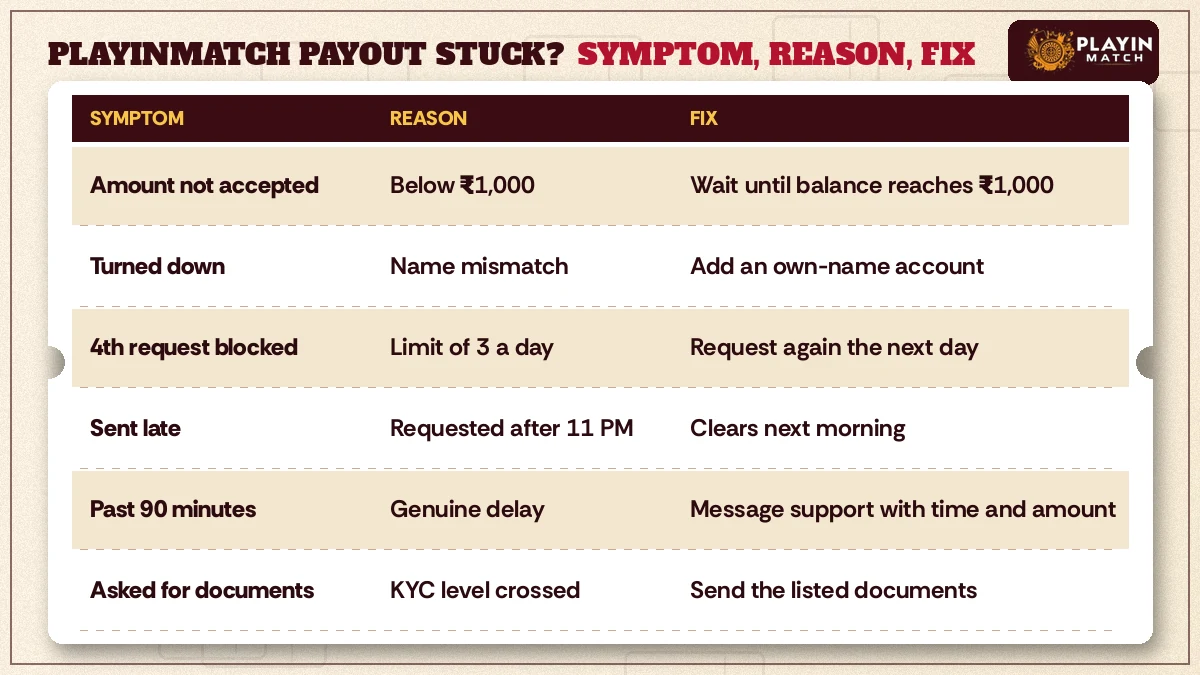
| What you see | Usual reason | What to do |
|---|---|---|
| The form will not accept your amount | Amount or balance below ₹1,000 | Wait until the balance reaches ₹1,000, then request again |
| Request turned down soon after sending | Bank account holder is not the ID holder | Add an account in your own name and resend |
| A fourth request will not go in | Daily limit of 3 already used | Try the next day, or ask the desk about timing |
| Sent late, nothing overnight | Submitted after 11 PM | Normal; it clears the next morning |
| Past 90 minutes, sent before 11 PM | A genuine delay | Message support with the time and amount |
| Asked for documents | Lifetime withdrawals crossed the KYC level | Send the documents listed on the safety page |
Five of those six rows fix themselves once you know which one you are in. Only the fifth, a real delay, needs a person.
PlayinMatch Withdrawal Problem Today: The Top Three Checks Before You Message
Stuck PlayinMatch withdrawal today? Run three quick checks. First, the time you sent it, because 11:02 PM and 10:58 PM are very different requests. Second, the minutes since then; under 90 means wait. Third, your bank statement rather than the SMS alone, since texts sometimes arrive late or not at all.
All three point to a problem? Then it is worth a message, and the more exact you are the faster it goes.
PlayinMatch Withdrawal Problem Telegram: The Reliable Way to Reach Support
PlayinMatch support answers on WhatsApp and on Telegram, and the current contact details for both sit on the PlayinMatch customer care page. Use the channel listed there rather than a Telegram account that found you in a group claiming to be the desk.
What to send, in one message: your PlayinMatch username, the amount, the exact time you submitted, and the last four digits of the bank account. That is it. Never a password, never an OTP (nobody at a genuine desk needs either to trace a payout).
Popular PlayinMatch Withdrawal Searches From Players in India
- playinmatch withdrawal time
- playinmatch withdrawal kitne time me aata hai
- playinmatch withdrawal pending kyu hai
- playinmatch withdrawal problem today
- playinmatch withdrawal problem telegram
- playinmatch paisa kaise nikale
- playinmatch how to withdraw money
- playinmatch minimum withdrawal 1000
- playinmatch deposit problem today
- playinmatch deposit nahi aaya
- playinmatch kyc for withdrawal
- playinmatch withdrawal time in india
Top PlayinMatch Withdrawal Time Facts, Folded by Question
PlayinMatch withdrawal time in India: the reliable numbers
The PlayinMatch withdrawal time in India is 45 to 90 minutes by IMPS for any request sent before 11 PM, with ₹1,000 as the smallest amount you can take out and three requests as the most you can send in one day. A late request is not lost; it clears the next morning. The playinmatch withdrawal itself always goes to a bank account in the same name as the ID.
PlayinMatch withdrawal pending or a withdrawal problem today: the proven order of checks
A playinmatch withdrawal pending status under 90 minutes is normal. Past that, a playinmatch withdrawal problem today is nearly always one of amount, name, count or cutoff, and the router table above sorts them. For a playinmatch withdrawal problem telegram query, use only the Telegram and WhatsApp contacts on the care page.
PlayinMatch deposit problem and how to withdraw money: the best short version
A playinmatch deposit problem today usually means the 10 to 20 minute credit window for a ₹300 UPI, IMPS or bank transfer top-up has not yet passed. For playinmatch how to withdraw money, the table lists the short path.
| Deposit | From ₹300, 10 to 20 min |
|---|---|
| Withdrawal | From ₹1,000, 45 to 90 min |
| Cutoff | 11 PM, then next morning |
PlayinMatch Deposit Problem: Reliable Fixes When ₹300 Has Not Landed
Your first PlayinMatch deposit starts at ₹300 and can be paid by UPI, IMPS or a normal bank transfer, and it is usually credited to the wallet within 10 to 20 minutes. So if you paid five minutes ago, nothing is wrong yet.
Why does a deposit belong on a withdrawal page at all? Because the two are tied together in practice. People who top up in a hurry from whichever account is handy tend to be the same people who hit the same-name rule later, when they try to cash out to their own bank. It is cleaner to pay in from an account in your own name from the start. The same-name rule is written for payouts, to be precise, and we have not seen a firm PlayinMatch rule for deposits from a family member's UPI, but it is the kind of detail that can make a later payout slower, so ask before you do it.
Keep the UPI reference number, sometimes shown as the UTR, from your payment app. It is the the one detail that lets support match your ₹300 to your PlayinMatch ID in a single step.
PlayinMatch Deposit Problem Today: Clear Steps After the 20-Minute Mark
- Confirm the money actually left your bank. A UPI payment that failed on your side never reaches PlayinMatch.
- Check the amount. A first top-up below ₹300 does not meet the PlayinMatch minimum.
- Wait out the full 20 minutes. Minute 12 is still inside the window.
- After that, send support your username, the amount, the payment time and the UTR.
That covers most of it. Slow deposits sort themselves out; one that is stuck needs the reference number more than it needs a second payment, and paying twice to hurry things along only gives support two transactions to trace instead of one.
Why Is My PlayinMatch Withdrawal Pending? Proven Reasons, Clear Next Moves
Three things put a pending label on a PlayinMatch payout, and two of them are nothing more than time: the request is still inside its 45 to 90 minute window, or it arrived after 11 PM and is parked until morning. The third, a hold over the bank name or KYC papers, is the only one you have to act on.
Pending is a status. It is not a verdict.
Here is how the reasons usually split, and how to tell them apart without guessing. Under 90 minutes old and sent before the cutoff? Do nothing; that is simply the process. Anything sent at 11:05 PM or later will show pending all night, which looks alarming at 2 AM and is completely expected. When it has sat for well over 90 minutes during the evening, the likely cause is a name mismatch or a document request, and a message to the desk with your time and amount will usually get a straight answer. On rare occasions the delay sits with the receiving bank rather than with PlayinMatch, which is why checking the statement (not just the SMS) is part of the routine.
PlayinMatch Withdrawal Pending Overnight: The Clear Morning Rule
An overnight pending PlayinMatch request is the one that worries people most and needs the least from them. Sent after 11 PM, it waits. By the next morning it moves again, and there is no benefit in cancelling it and sending a fresh request at dawn; if anything that burns another of your three daily PlayinMatch requests. Leave it alone. Check your bank once you are up.
PlayinMatch Withdrawal Questions Players Ask Most, With Clear Answers
How long does a PlayinMatch withdrawal take to reach my bank?
Plan on 45 to 90 minutes for a PlayinMatch payout to land, counted from the moment you press submit, with the money moving by IMPS. That window covers ₹1,000-plus requests placed before 11 PM into a bank account in your own name. Anything submitted after 11 PM waits in the queue and arrives the following morning.
My PlayinMatch withdrawal is stuck today. Is something wrong?
Probably not, if it went in before 11 PM less than 90 minutes ago, since that is still the normal IMPS window. A request sent at 11:10 PM simply waits for morning. Only a pre-cutoff PlayinMatch payout past 90 minutes, with nothing on your bank statement, needs a support message quoting the submit time.
Why is my PlayinMatch withdrawal still showing pending?
Mostly it is just the clock. PlayinMatch requests sit on pending for up to 90 minutes before the IMPS credit, and all night when they were sent after 11 PM. An evening request still pending long after 90 minutes points to something else, usually a name mismatch on the bank account or a KYC document request.
How do I withdraw money from PlayinMatch?
Sign in to the PlayinMatch ID that holds the balance, open the withdrawal form in your wallet and enter at least ₹1,000. Confirm a bank account held in your own name, submit before 11 PM and note the time. The IMPS credit normally follows within 45 to 90 minutes.
What is the minimum amount I can withdraw on PlayinMatch?
The smallest PlayinMatch withdrawal is ₹1,000. Below that figure the request will not go through, so a balance of ₹900 has to grow before it can be cashed out. There is also a limit of three withdrawal requests per day, which makes one larger request better than several small ones.
My PlayinMatch deposit has not arrived today. What now?
Give it the full 10 to 20 minutes a PlayinMatch deposit normally takes, and check the first top-up was at least ₹300. If the money left your bank and 20 minutes have passed, send support your username, the amount, the payment time and the UPI reference number shown in your payment app.
Can I send a PlayinMatch withdrawal to someone else's bank account?
No, and this rule has no exceptions on PlayinMatch. The name on the receiving account must match the name on the ID, which rules out accounts belonging to a spouse, parent or friend. Add a bank account you hold yourself, type the holder name exactly as your passbook shows it, then send the request again.
How many PlayinMatch withdrawals can I request in a day?
You can send up to three PlayinMatch withdrawal requests in a day, each for ₹1,000 or more. Because of that cap, it usually makes sense to take out one larger amount rather than splitting it. If you are near the limit late at night, ask the desk before sending another.