
PlayinMatch in the browser · no download
PlayinMatch Online — Premium Browser Lobby to Bet Without Any Install
Open a browser, type the PlayinMatch address and sign in with the username and password the WhatsApp desk sent you. Nothing to install, no storage to free up. Cricket markets, Aviator and the live dealer tables all run inside that one tab, and the wallet you see is the same wallet the app shows.

Premium PlayinMatch Online Sign-In Card for Any Browser Tab
Allow pop-ups for the PlayinMatch address before you press the button below. The sign-in form opens as a popup, and a blocked popup looks exactly like a dead button.
Which Browser Runs PlayinMatch Online Best?
Chrome is the smoothest home for PlayinMatch online, on an Android phone and on a Windows laptop alike, with Safari a close second on iPhone and Mac. Firefox and Samsung Internet also load the lobby. Both ship with stricter tracking and pop-up defaults, though, so plan on changing one or two settings before the login form shows up.
None of this is about speed. All four browsers draw the PlayinMatch pages at roughly the same pace on a normal 4G connection. What differs is how politely each one treats a popup and a login cookie, and those two things decide whether you are betting in thirty seconds or tapping a button that seems broken.
So the rows below are short on purpose. Each one is a thing you actually tap.
PlayinMatch Online on Chrome — Proven Setup for Android and Laptop
- Save the address to the bookmarks bar, taking it from our PlayinMatch com mobile address page rather than a search, because search listings trail behind by weeks. Blocked tomorrow? Edit that one bookmark. Nothing about your PlayinMatch login or wallet changes with it.
- Tap the small icon on the left of the address bar, open Site settings, find Pop-ups and redirects, and set it to Allow. This is the step people skip.
- Hit Login and fill in the PlayinMatch username (or the phone number tied to the ID) plus the password. Remember me belongs on your own device only.
- On Android, open the three-dot menu and choose Add to Home screen. You get a PlayinMatch icon that opens the browser lobby straight away, with no APK involved.
- On a laptop, pin the tab (right-click, Pin). A pinned tab survives when you close the other twenty tabs by accident, and it keeps the session alive.
PlayinMatch Online on Safari — Clear Settings for iPhone and Mac
- On iPhone go to Settings, then Safari (newer iOS versions tuck it under Apps), and turn Block Pop-ups off while you sign in. You can switch it back on after the session is saved.
- If Safari throws you back to the sign-in screen on every refresh, Prevent Cross-Site Tracking is the likely cause. Turn it off, sign in once, test a refresh, then decide whether to leave it that way.
- On a Mac, open Safari Settings, then Websites, then Pop-up Windows, and set the PlayinMatch address to Allow. That permission sticks to the one site and nothing else.
- Share, then Add to Home Screen, drops a PlayinMatch tile among your other icons. Tapping it opens Safari straight at the lobby, already signed in if Remember me was ticked on that iPhone.
PlayinMatch Online on Firefox and Samsung Internet — Reliable Tweaks
- Firefox: click the shield icon next to the address and switch tracking protection off for this site if the login keeps looping. The switch is per site, so your other browsing stays protected.
- Firefox pop-ups: Settings, then Privacy & Security, then Permissions, then Exceptions beside Block pop-up windows. Add the PlayinMatch address there.
- Samsung Internet: the menu has a Sites and downloads section with a Block pop-ups switch, plus Smart anti-tracking under the privacy settings. Menu names shift a little between versions, so look for those words rather than an exact path.
- Samsung Internet's forced dark mode can repaint the PlayinMatch lobby in odd colours (odds cells become hard to read). Turn dark mode off for the site, or for the whole browser while you play.
PlayinMatch Online on a Work or Shared Laptop — Reliable Habits
Office machines are a different animal. Many company networks filter betting addresses at the router, and a managed browser may lock the pop-up setting so you cannot change it even if you find it. If the PlayinMatch page times out on office Wi-Fi but opens fine on your phone's mobile data, it is the network, not the site and not your ID. A phone hotspot for the laptop usually settles it.
Three habits for any machine that is not yours:
- Open a private or incognito window before you type the PlayinMatch address. Nothing survives the window closing.
- Leave Remember me unticked, even if it is tempting on a long match day.
- Check the downloads and history are clean if you used a normal window by mistake (history holds the address, not your password, but still).
Tablets sit somewhere in between. An iPad in Safari may ask for the desktop version of pages by default, which for PlayinMatch online is actually fine on the larger screen; an Android tablet in Chrome behaves like a big phone. Try both views and keep whichever shows the markets without sideways scrolling.
Why Is PlayinMatch Online Not Loading? Proven Browser Fixes
Most of the time PlayinMatch online fails in a browser for one of four reasons: a pop-up blocker is swallowing the login form, old cached files are clashing with an updated page, the domain you typed has been blocked, or cookies are swithed off so the session never saves. Each has a two-minute fix, listed below in the order they tend to happen.
- Login does nothing. That is the pop-up blocker nearly every time. Look for a small crossed-out window icon at the right edge of the address bar on a laptop, or a banner at the bottom on a phone, and choose Always allow for PlayinMatch.
- Endless spinner or a half-drawn page. Delete the stored data for this one site rather than wiping the whole browser. In Chrome that is the icon beside the address, then Site settings, then Delete data. You will be signed out, which is expected; sign in again and the page should come up clean.
- The address will not open at all. A blocked domain looks like a timeout or a warning page. Check the current PlayinMatch mirror list and open that address instead; your ID, password and balance are unchanged.
- Signed out every single visit. Cookies are blocked, or you are in a private or incognito tab. Private tabs forget everything when they close. That is fine on a borrowed phone and annoying on your own.
- Squashed layout. A phone pretending to be a desktop crams the PlayinMatch lobby into tiny print. Untick Desktop site in the browser menu. On a small laptop the reverse can help: zoom out to 90% and the cricket markets fit without sideways scrolling.
- Odds stop moving after the phone locks. Browsers pause background tabs to save battery. Pull down to refresh when you come back, and check the price in the bet slip before you confirm.
One composite case we see a lot: somebody on a shared office laptop taps Login during lunch, nothing happens, and they tap it four more times. The crossed-out popup icon sits at the end of the address bar. One click on Always allow and the form appears. Five taps wasted, zero things broken.
A seventh case is not a browser problem at all. The popup opens, you type, and the form says the details are wrong. No setting above fixes that. Use the forgot-password option inside the the PlayinMatch popup, or ask the WhatsApp desk, open 24 hours, to reset it, then sign in fresh.
What Does a PlayinMatch Online Session Keep? A Clear Browser Receipt
A PlayinMatch online session keeps very little on the device: a login cookie that holds you signed in, an optional 30-day remember setting, and some cached images. Your balance, bets and history stay on the account itself, which is why the same PlayinMatch ID shows identical numers in any browser and in the app.
Think of it as a receipt the browser hands you when you walk in. Here is what is printed on it.
- Login cookie
- A small file that tells PlayinMatch you have already signed in, so switching from the cricket tab to the casino tab does not ask for the password again.
- Remember me
- Ticked, the browser keeps you signed in for 30 days on that profile. Unticked, the session ends when the browser decides it is idle.
- Wallet balance
- Not stored in the browser at all. It is read from your PlayinMatch account each time a page loads.
- Bet history
- Held on the account side, so a bet placed on the app shows up in the browser history and the other way round.
- Password
- Only saved if you let the browser's own password manager keep it. On a shared machine, press Never.
- Cached files
- Images and page styling. Clearing them costs nothing except a slightly slower first load.
- Shared device exit
- Log out from the account menu first, then close the tab. Closing the tab alone leaves the cookie behind for the next person.
The 30-day window is per browser, not per person. Sign in on Chrome with Remember me ticked and Firefox on the same laptop still asks for the password, because each browser keeps its own cookies. The same goes for a second Chrome profile. And anything that wipes cookies ends the 30 days early: a cleaner app on Android, the clear-data step from the fixes above, or a browser set to delete cookies on exit. None of that touches your PlayinMatch account. You sign in again, that is all, and the balance is exactly where you left it.
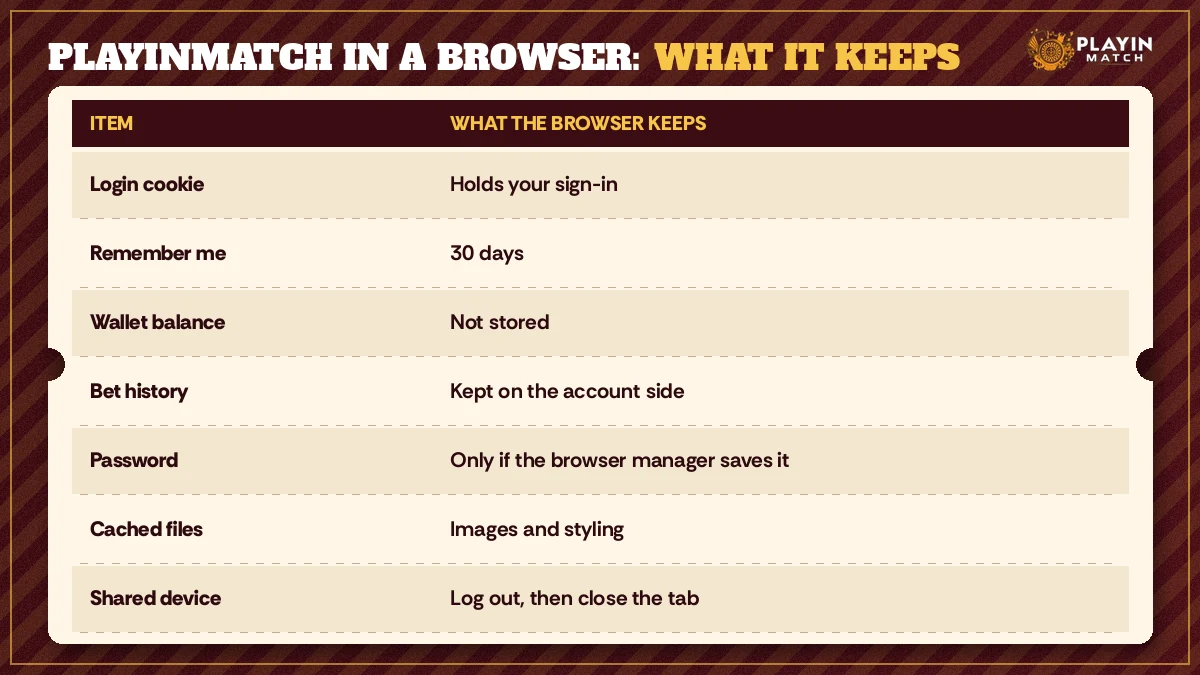
That last line on the receipt matters more than the rest put together. A borrowed phone, a cousin's laptop, the computer at a cyber café: log out properly, then close the tab. Or skip the question entirely and open a private tab, which forgets the PlayinMatch session the moment you close it.
PlayinMatch Online or the PlayinMatch App — Top Differences
Both routes open the same account. The browser asks for nothing: no storage, no permission to install from outside the Play Store, no update to download before the weekend match. The app, which is covered on the PlayinMatch app features page, stays signed in more stubbornly and sits on the home screen without a browser around it.
Size is the usual deciding factor on a crowded phone. The Android build has its own download page, and the PlayinMatch APK download page lists the file size and the install steps, so check there before you clear space. On iPhone there is no APK, so the browser is the only route anyway.
In practice plenty of people use both. APK on the personal phone, PlayinMatch online on the work laptop. The balance is the same, the ID is the same, and a bet placed in one shows in the other.
Popular PlayinMatch Online Sports Markets in a Browser Tab
Cricket is where most PlayinMatch online traffic goes, and a laptop browser is arguably the nicest way to follow it: a wider screen shows more of the market list at once, and the bet slip does not cover the prices the way it can on a small phone. Kabaddi sits in the same sports menu, raid by raid, and the full list of what is running today lives on the PlayinMatch live sports page.
A few browser habits help here.
- Keep one PlayinMatch tab for sports. Two tabs on the same match can show slightly different prices if one has been sitting in the background.
- Refresh after the phone has been locked. Prices do not update in a paused tab.
- Set the zoom once. Chrome and Firefox remember zoom per site, so shrinking the PlayinMatch tab to 90% on a small laptop sticks for next time.
Deposits and payouts do not care which screen you use. A UPI top-up (₹300 is the smallest) reaches the PlayinMatch wallet in minutes, and a payout goes out over IMPS to a bank account in your own name, normally 45 to 90 minutes after you request it. That clock runs identically for a browser request and an app request. A question we get: can a deposit made from the app be used for a bet placed in Chrome? Yes. One wallet. The browser just reads it.
Topping Up PlayinMatch Online From a Phone Browser — Proven Order
Deposits trip up browser users more than bets do, mostly because the phone jumps out to a UPI app and back. Keep the PlayinMatch tab open while you pay; do not close it to “tidy up” after the UPI app opens. When you return, give the wallet a refresh before you assume anything went wrong. If ₹300 left your bank and the PlayinMatch balance still shows the old figure after a few minutes, send the UPI reference number to the WhatsApp desk rather than paying a second time. Two payments for one missing credit is the most common mess we see, and it takes longer to untangle than the original problem.
An 18+ note, tied to the sports tab specifically: set a daily top-up limit in your head before the toss, because an open browser tab on a work laptop is very easy to keep glancing at.
Popular PlayinMatch Online Searches From Browser Players
- playinmatch online
- playinmatch online login
- playinmatch online without app
- playinmatch chrome login
- playinmatch laptop par kaise khele
- playinmatch web version
- playinmatch safari iphone
- playinmatch online casino
- playinmatch browser not opening
- playinmatch online id
Top PlayinMatch Online Browser Notes in One Fold
Playing without an install
People searching playinmatch online tend to arrive with one of two problems: a phone too full for another app, or a work laptop where installing anything is out of the question. The browser version answers both. Sign in with your existing PlayinMatch ID and Chrome, Safari, Firefox or Samsung Internet will carry the cricket and kabaddi markets, Aviator, Andar Bahar and the dealer tables.
If the browser refuses to cooperate, three settings explain most failures: pop-ups blocked for the address, a stale cache, or cookies switched off.
Browser checklist
- Allow pop-ups for the PlayinMatch address so the login form can open.
- Keep cookies on; tick the 30-day remember option only on your own device.
- Turn Desktop site off on a phone, zoom to 90% on a small laptop.
Leaving a shared device
- Open the account menu and log out of PlayinMatch.
- Close the tab, or the whole private window.
- Say no if the browser offers to save the password.
A private tab does all three for you on a cyber café machine, which is why it is the safer default there.
The balance, bet history and payout requests belong to the account, so the playinmatch online view and the app always agree.
Premium PlayinMatch Online Casino Tables Without an Install
The casino side of PlayinMatch opens in the same tab as the cricket markets, and for a lot of people it is the reason they stay on the browser version. Aviator and Andar Bahar both have free demo rounds, which makes a browser tab a sensible place to learn the controls before a single rupee goes in. The whole game list, from crash games to card tables, is laid out on the PlayinMatch casino lobby page.
Live dealer tables are the heaviest thing PlayinMatch online will load. A dealer table pulls far more data than a cricket market or an Aviator round, so on mobile data expect the picture to soften for a moment when the signal dips. Wi-Fi on a laptop is the comfortable setup. On a phone, turn it sideways; the table view uses the width.
Two small browser quirks show up on casino games in particular:
- Sound often starts muted. Browsers block autoplay audio until you tap something on the page, so tap the table once and the dealer's voice comes back.
- Battery saver slows animations. Aviator's climb can look jerky with power saving on; that is the phone, not the round.
Crazy Time and the slot titles sit in the same PlayinMatch lobby and behave the same way in a browser. There is no casino-only login and no second wallet. The ₹300 you topped up for Sunday's match is the ₹300 the Andar Bahar table sees (minus whatever the match did with it, of course).
PlayinMatch Online Browser Questions — Clear Answers
Can I use PlayinMatch online without installing the app?
Yes. PlayinMatch online runs fully inside a browser, so you can sign in, top up, bet on cricket and play the casino tables without the app. Use the same ID and password the WhatsApp desk gave you. Allow pop-ups for the address first, because the login form opens as a popup.
Which browser suits PlayinMatch online best?
Chrome is the smoothest choice on Android phones and laptops, and Safari is the natural pick on iPhone and Mac. Firefox and Samsung Internet also work, but their stricter tracking and pop-up defaults may need one setting changed for the PlayinMatch address before the login form appears.
Does PlayinMatch online run on a laptop?
Yes, and a laptop is arguably the most comfortable way to use it. The wider screen shows more cricket markets at once and keeps the bet slip clear of the prices. Open the PlayinMatch address in Chrome, Safari or Firefox, sign in, and pin the tab so it stays open.
Why is PlayinMatch not opening in my browser?
Usually one of four things: a pop-up blocker hiding the login form, old cached files, a blocked domain, or cookies switched off. Allow pop-ups, clear data for that one site, and if the address will not open at all, use the current mirror listed on the PlayinMatch com mobile page.
Is my PlayinMatch balance the same online and in the app?
Yes. The balance lives on your PlayinMatch account, not on the device, so the browser and the app read the same wallet. A UPI top-up made in the app shows in the browser straight away, and a bet placed online appears in the app history too.