
PlayinMatch Aviator practice booth
PlayinMatch Aviator — Top Free Crash Demo to Practise the Cash-Out
Practise the cash-out on the PlayinMatch Aviator demo below with 1,000 play coins: set a stake, watch the multiplier climb from 1.00x and press before the plane leaves. When the timing feels right, sign in and open Spribe's Aviator, where two bet slips and an auto cash-out box sit under the same curve.
Top PlayinMatch Aviator Sign-In Before the Next Take-Off
An account is needed only for the real Spribe round; the practice curve further down runs with no login at all.
PlayinMatch Aviator Crash Demo — the Best Place to Rehearse a Cash-Out
This is the part of the PlayinMatch Aviator page you can actually play with. You get 1,000 demo coins. Pick a stake from 10 to 500 (the field moves in steps of 10, or tap one of the 10, 50, 100 and 250 chips), press Place Demo Bet, and the curve starts to rise. While the round is live, that same button flips to Cash Out Now.
One thing to understand before you play: the demo draws random practice multipliers inside your browser. It is not the Spribe game. It pays nothing, and a run of good rounds here tells you nothing about the next real PlayinMatch Aviator round.
So what is it for? Timing. Crash games reward a decision made in under a second, and most first presses come late because the eye wants to see one more tick. Here you can feel that pull without it costing a rupee. Cash out at 1.40x a few times. Then try holding to 2.00x. You will notice how different the two feel, even though the button is the same.
Along the top, a strip keeps your last ten demo results, and anything at 2x or above is marked out from the rest. Watch it for a while and the pattern you think you see will vanish again a few rounds later, which is roughly the point. Auto cash-out at (x), the second field, accepts anything from 1.1 to 50; leave it empty and the demo waits for your press instead.
Phone set to reduce motion? Then the PlayinMatch demo skips the flight animation and shows each result straight away, with your auto cash-out value still applied, so the drill works, just without the climb to watch.
Run out of coins? Drop below 10 and the PlayinMatch demo refills you to 1,000 on its own. Reloading the page does the same.
If you want some structure, work through this on the PlayinMatch demo before the real Aviator round ever loads:
- Ten rounds at a 50-coin stake, pressing by hand each time at what feels like 1.50x. Note where you actually pressed.
- Ten more with 1.5 typed into the auto field and your hands off the screen. Compare the two sets of numbers.
- Ten rounds holding by hand for 2.00x. Count the flights that never got there.
- Reload, and repeat only the drill that felt worst.
Nobody scores this. What you get out of it is a sense of how late your own thumb runs, which varies a lot between people, and how much calmer a pre-set number feels than a live press. Some players jot the results in a phone note (most never bother).
Payouts in the demo follow plain arithmetic: stake times the multiplier at the moment you pressed, rounded down to whole coins. A 50-coin stake cashed at 1.86x returns 93 coins. If the plane leaves first, the 50 is gone and the result line says so.
How Does a PlayinMatch Aviator Round Run? A Clear Order of Events
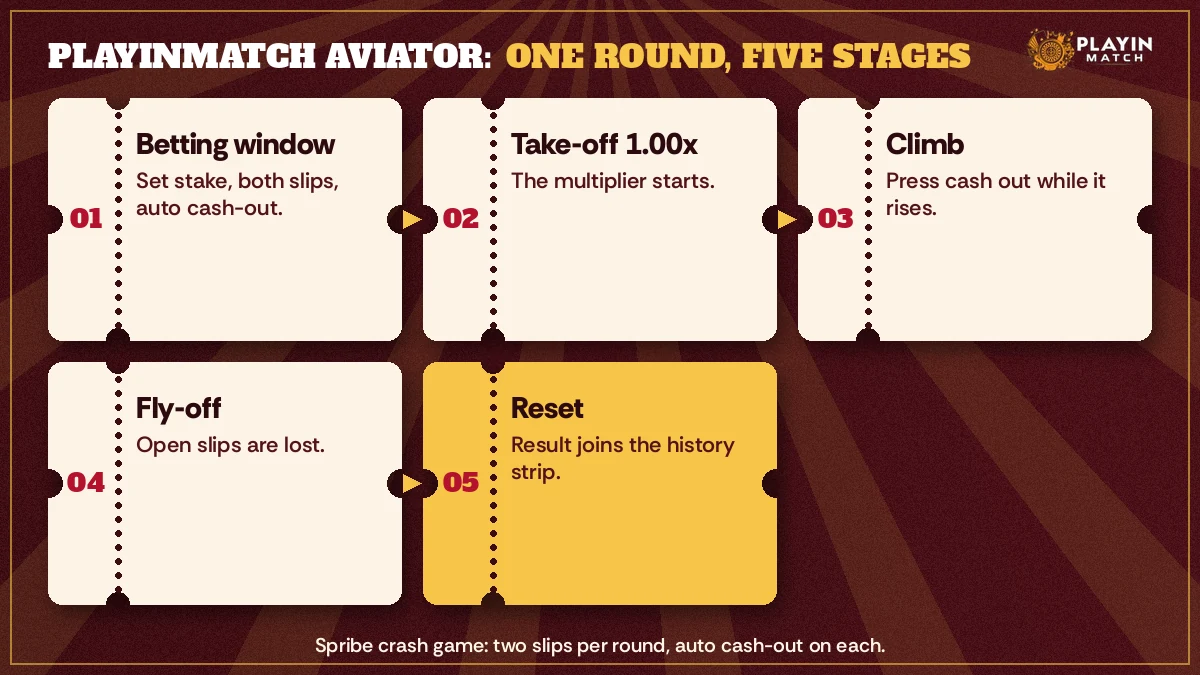
Each PlayinMatch Aviator round has four beats and no surprises in the order: a short window for stakes, take-off from 1.00x, a climb during which you may press, and a fly-off that settles whatever is still open. A fresh window follows straight after.
That sounds simple, and on the Spribe screen it is. Order matters, though, because each step has one thing you can do and one thing you cannot:
- Betting window. You set the stake on one or both slips and, if you want, an auto cash-out value. You cannot change a slip after take-off.
- Take-off. At 1.00x the curve begins. Your press is now the only input that counts.
- Climb. Every tick raises what a live slip would pay. Press cash out and that slip is settled at the current number; the other slip, if any, keeps flying.
- Fly-off. Nobody on the PlayinMatch side controls where the plane leaves or can see it in advance; any slip still open at that moment is lost.
- Reset. Your result joins the history strip and a fresh betting window opens.
Spribe's screen also carries a row of recent fly-off numbers, much like the strip on our demo. PlayinMatch players tend to read it the way cricket fans read the last six balls, hunting for a streak. It is a record and nothing more. Each round draws from its own seed, so three low flights in a row do not make a high one due, and one long flight does not make the next one short.
Where do people lose track? Mostly at stage three. A curve like this speeds up the longer it runs, so a press that felt early at 1.20x feels far too slow at 3x. Practise that stage on the demo above before you try it in the PlayinMatch casino.
Can You Place Two Bets in PlayinMatch Aviator? Popular Two-Slip Setup Explained
Yes. Spribe's Aviator gives every player two bet slots per round, side by side under the curve, and PlayinMatch Aviator shows both. Each slot has its own stake, its own cash-out button and its own auto cash-out setting, so the two can be closed at completely different moments in the same flight.
Why would a PlayinMatch player want two? Mostly to take somehing off the table early and leave something riding. Here is how the arithmetic plays out, using round numbers rather than a suggestion of what to stake:
| Slip | Stake | Closed at | Comes back |
|---|---|---|---|
| Slip one | 100 | 1.50x (pressed) | 150 |
| Slip two | 100 | Still open when the plane left at 1.80x | 0 |
| Round total | 200 | 150 |
Same round, different fly-off. Had the plane gone on to 3.00x and you pressed slip two at 2.60x, it would have returned 260, and the round total would read 410 back from 200 in. Neither slip changes where the plane leaves, on PlayinMatch or anywhere else Spribe's game runs. Two slips only change how your stake is spread across the one flight you are watching.
A composite from the WhatsApp desk: a player tops up on a Sunday evening, opens PlayinMatch Aviator, sets both slips, and then freezes, because pressing one button while the other is still live is harder than it looks. Most of them ask the same thing the next morning. Can I just automate one of them? You can, and that is the next section.
Two PlayinMatch Aviator slips, two decisions. If that feels like one too many, close the second slip and play a single bet until the timing is second nature.
PlayinMatch Aviator Auto Cash-Out — a Reliable Exit You Set Before Take-Off
Think of auto cash-out in PlayinMatch Aviator as a standing order written on the slip: you enter a number such as 1.50x during the betting window, and if the jet is still airborne when the curve touches it, the slip settles by itself. A flight that ends sooner still takes the stake.
That second half is the bit people skip. Auto cash-out is not a safety net. It is a pre-made decision, nothing more. Set 2.00x on a slip and the plane leaves at 1.94x, and the slip is gone just as if you had frozen.
Where it genuinely helps on PlayinMatch is with two slips. A common setup looks like this: slip one on auto at a low number, slip two pressed by hand. You only have one button to watch. Cashing out before 2x is where most people start, and and a low auto value on one PlayinMatch slip does exactly that without any thought on your part.
- Open the slip you want to automate and switch Auto Cash Out on.
- Type the multiplier, for example 1.50. Check the decimal; 15.0 is a very different instruction.
- Place the bet during the window. Once the plane lifts, that value is locked for the round.
- Leave the other slip on manual, or automate that one too at its own number.
Our PlayinMatch demo copies the idea with its Auto cash-out at (x) field. Type 1.5, place a demo bet and keep your hands off the button. Watch how often the curve gets there and how often it does not. That exercise, repeated for five minutes, tells you more about auto cash-out than any explanation will.
Popular PlayinMatch Aviator Searches That Lead Here
- playinmatch aviator
- playinmatch aviator predictor
- playinmatch aviator hack
- playinmatch demo game
- playinmatch aviator demo free
- playinmatch aviator kaise khele
- spribe aviator playinmatch
- playinmatch aviator login
- aviator auto cash out playinmatch
- playinmatch crazy time
- playinmatch casino games
PlayinMatch Aviator, Predictor and Demo Game — Clear Keyword Notes
Open the PlayinMatch Aviator notes
People search for PlayinMatch Aviator when they want the Spribe crash game inside a PlayinMatch account: one curve, two bet slots per round, an auto cash-out setting on each, and a round that ends the moment the plane flies off. This page answers that search with a practice curve first and the real round second.
Searches for a playinmatch demo game usually mean the practice curve above. It runs on demo coins, needs no ID and draws random multipliers of its own, so treat it as timing practice, not as a preview of Spribe results.
- playinmatch aviator predictor: an app or bot that claims to forecast the fly-off point
- playinmatch aviator hack: a tool or script that claims to change or read a round early
- playinmatch demo game: the free coin curve on this page
Neither a PlayinMatch Aviator predictor nor a PlayinMatch Aviator hack can do what it promises, because the crash point is fixed by a provably fair seed before bets close. Further down you will find why, and what those apps usually want from you instead.
- Where the real round lives
- In the PlayinMatch casino lobby, after sign-in.
- Where the practice round lives
- On this page, open to anyone, no account.
No ID yet? Requesting one is covered on the join PlayinMatch page, while everything specific to Aviator stays on this one.
Does a PlayinMatch Aviator Predictor or Hack Work? A Proven No
No. Whatever a PlayinMatch Aviator predictor promises, it has no route to the fly-off number, and a hack has no way to move it. Spribe seals every crash point with a seed and publishes its hash before the betting window shuts, so by the time you see the plane, the answer already exists and cannot be touched.
On PlayinMatch you can test this yourself between rounds. Tap the multiplier pill of a finished round in the history strip at the top of the Aviator screen, copy the server seed and the three player seeds it lists, and paste them into any SHA-512 checker. The value you get should equal the hash that was on display before the jet took off; if a crash point had been changed after the bets closed, the two strings would differ.
So what are the predictor apps doing? Some show random numbers dressed up as signals. Some are simple guessing screens that are right just often enough to look clever. Worst of all are the ones that ask for your PlayinMatch username and password so they can "connect" to the game.
Any app, Telegram bot or website that asks for your PlayinMatch login to predict Aviator is trying to take the account, not read the round.
Search for a PlayinMatch Aviator hack and most of what turns up is an APK from a seller with no name. An app installed that way may be able to watch what you type elsewhere on the phone, PlayinMatch passord included, which is the same theft by a longer road.
Hand over those details and whoever runs the tool can sign in as you, move the balance, and change the password before you notice. Our PlayinMatch desk will never ask for your password over WhatsApp or anywhere else, and neither will any legitimate helper. Put another way, a login request from a predictor is theft with a friendly screen on top.
Paid signal groups work no differently. They can post a number every round; the round does not care. If a history strip seems to show a pattern, open the demo, play thirty rounds, and watch the pattern appear and dissolve on numbers that are, by design, random. That costs nothing, which a signal subscription does not.
PlayinMatch Aviator Demo Versus the Spribe Round — a Clear Comparison
Our PlayinMatch Aviator demo and the real Spribe round share a shape, not a result. Both have a climbing multiplier, a cash-out press and an auto cash-out field; only the Spribe round uses real stakes, two bet slots, a provably fair seed and a payout to your PlayinMatch balance.
| Point | Demo on this page | Spribe Aviator on PlayinMatch |
|---|---|---|
| Account needed | No | Yes, signed in |
| Money | 1,000 demo coins, refills | Your wallet balance |
| Bet slips | One | Two per round |
| Auto cash-out | Yes, 1.1x to 50x | Yes, per slip |
| Where the result comes from | Random demo numbers in your browser | Provably fair seed, fixed before take-off |
| Minimum stake | 10 demo coins | Shown on the bet slip itself |
One difference no table can show is pressure. A 50-coin demo loss is a number dropping in a practice box. The same press with your own PlayinMatch balance behind it feels slower, and plenty of people find they cash out earlier on their first real rounds than they ever did in practice. That is fine. Start with the smallest stake the slip allows and let the first few PlayinMatch rounds be about the button, not the balance.
That last row catches people. We do not quote a minimum stake for the real PlayinMatch Aviator round here, because the figure lives on the bet slip and is the only number that counts; read it there before the first round rather than trusting a number copied onto a web page.
A few small things tend to go wrong on the first real session, and none of them need the desk:
- Bet button does nothing? Most likely the window has closed; wait for the next round and place it again.
- Auto cash-out did not fire. Check whether the plane actually reached your number. If it left at 1.48x and you typed 1.50, it never got there.
- You pressed and it settled lower than you expected. A curve keeps moving between your press and the screen update; the settled figure on the slip is the one that stands.
- A stake was refused. Compare it with the limit shown on the slip; the slip decides, not your memory of last week.
Aviator is one table in a bigger room, by the way. The PlayinMatch game page runs a free Andar Bahar demo, and if you prefer a wheel host to a flight curve, PlayinMatch Crazy Time covers the live wheel show. Neither needs the cash-out reflex this page trains, which is probably part of their appeal for some players.
Ready for the real thing? The PlayinMatch sign-up steps explain how an ID is issued, and the rest happens inside the PlayinMatch live casino. Aviator is for adults 18 and over; set the evening's limit before the first take-off, not after the third.
PlayinMatch Aviator Questions With Clear Answers
How do I play PlayinMatch Aviator?
Open Aviator after signing in to PlayinMatch, type a stake into one bet slip, or both, before the plane lifts, and watch the multiplier. Pressing cash out settles that slip at the number on screen; waiting too long loses it when the jet flies off. Rehearse on this page's demo curve first.
Does a PlayinMatch Aviator predictor actually work?
It does not, whatever the download page says. A crash point in Spribe's Aviator is sealed by a seed and published hash before anyone bets, which leaves an app nothing to peek at. Treat any predictor that wants your PlayinMatch username or password as an attempt to steal the account.
Is there a working PlayinMatch Aviator hack?
There is no working hack. The round result is locked by its seed before take-off and can be checked afterwards, so a script has nothing to change. Sites selling a hack usually want payment or your PlayinMatch password; never share either, and report the request to the desk.
Can I place two bets in one PlayinMatch Aviator round?
Yes, and each of the pair works on its own. On PlayinMatch Aviator you might stake one slip for an early exit at 1.30x and leave the second running until you press; the jet makes a single flight that settles both. Either slip can also be switched off, so a single bet remains a normal choice.
What does auto cash-out do in Aviator?
Auto cash-out settles a slip automatically when the multiplier reaches the value you typed before take-off, for example 1.50x. If the plane flies off below that number, the slip is lost as usual. On PlayinMatch each of the two slips can carry its own auto value.
Is the Aviator demo on this page the same as the real game?
No. The demo uses random practice multipliers generated in your browser and 1,000 demo coins, with one bet slip. The real PlayinMatch Aviator round is the Spribe game, with two slips, real stakes and a provably fair seed. Use the demo for timing, not to guess results.
What is the minimum bet in PlayinMatch Aviator?
Check the bet slip inside the Aviator game after you sign in to PlayinMatch: whatever stake floor it displays is the one in force. We leave the figure off this page on purpose, because a copied number can go stale while the slip cannot. For practice, our demo accepts stakes from 10 coins.