
PlayinMatch score booth · 30-second refresh
PlayinMatch Live Score Today — Best Scorecard to Follow With Odds Open
Follow today's IPL and international scores on the board below, which pulls new numbers every 30 seconds, then sign in to your PlayinMatch ID so the in-play odds grid opens right beside the score. One screen, two things you need: where the innings stands and what the market thinks of it.

Reliable PlayinMatch Live Score Seat With Your Account Details
Reading the board needs nothing. Pairing it with the in-play odds grid needs a PlayinMatch login, so keep your username and password handy.
Where Is the Best PlayinMatch Live Score Today Board?
It is on this page, in the table directly below. The PlayinMatch live score today board loads inside your browser, lists every match it is currently tracking with score, stage and status, and fetches new figures every 30 seconds on its own. Signed in, you get those same figures sitting next to the in-play odds.
| Match | Score | Stage | Status |
|---|
The board fills in your browser and refreshes every 30 seconds.
Nothing on the table is typed in by hand. Rows arrive from the feed, so an empty table at 7 a.m. usually means nothing is being played at 7 a.m., not that PlayinMatch has broken.
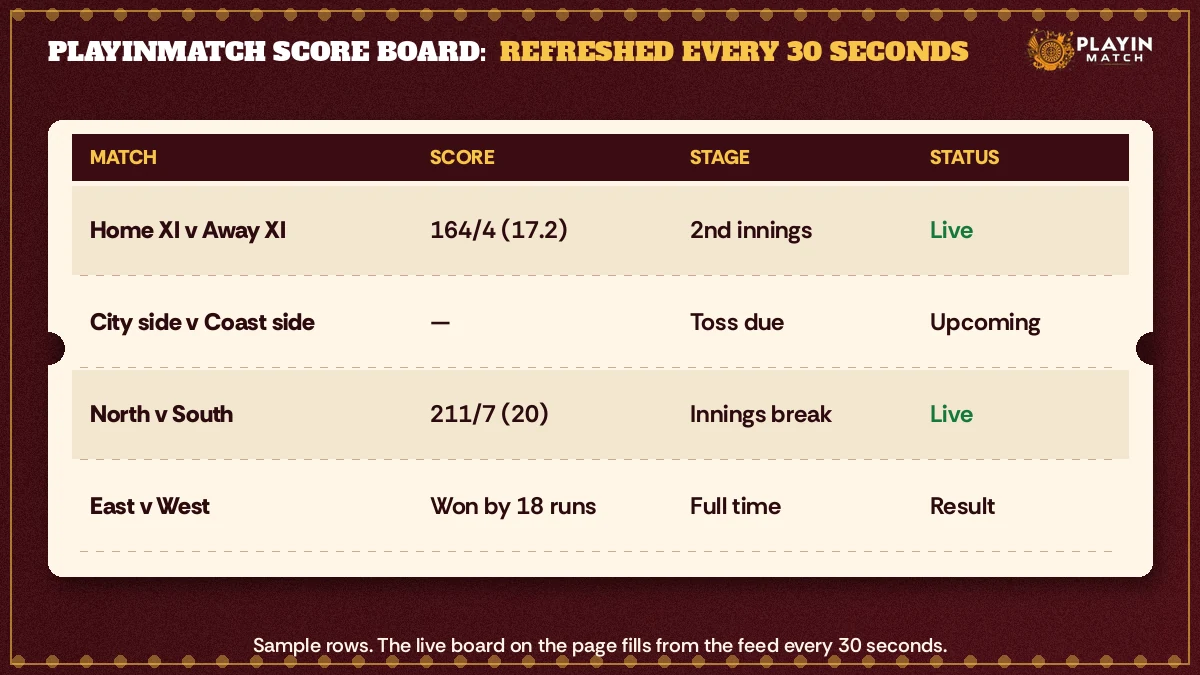
Reading the Four Columns on a Clear PlayinMatch Live Score Table
Match names the two sides. Score is runs and wickets for the batting team. Then comes Stage, which names the series or, for a game in progress, the innings being played. Status closes the row: live, a start time in IST, or finished.
Of the four, Stage does the most work and gets the least attention. A score of 92 for 2 in the first innings is a platform; the same 92 for 2 in a chase can be the start of a wobble, and the PlayinMatch odds grid is pricing exactly that difference. Glance at the stage before you glance at the runs. It takes a second and it stops you misreading a perfectly normal total as a collapse.
Runs tell you what happened. The innings tells you whether it was any good.
Which Matches Appear on the Top PlayinMatch Live Score Board?
IPL games and international cricket are what the board is built around. When a Test, an ODI and a T20 happen to overlap, you will see a row for each, which is useful on those crowded afternoons when one series is finishing as another starts.
Other sports have their own home. Football, kabaddi and the rest of what PlayinMatch covers are laid out on the PlayinMatch online live sports page, so this table stays a cricket scorecard and does not try to be everything at once.
What a Status Line Tells You on the Clear PlayinMatch Scorecard
The Stage and Status columns swap jobs as the day goes on. Before a ball is bowled, Stage names the series and Status gives the start time in IST, so the first row is often a match that has not begun. Once play starts, Status flips to Live and Stage switches to to the innings in progress, first or second. After the last delivery, Status reads Finished, both totals stay in the Score column for a while, and Stage goes back to naming the series.
Exact wording comes from the feed, so it can vary a little from match to match. The pattern holds, though. Read the Status line on the PlayinMatch board as the one-sentence summary of where the game is, and the other three columns as the evidence behind it.
Empty PlayinMatch Live Score Board? Reliable Checks Before Anything Else
Start with the clock. If there is no IPL game or international on at that hour, there is nothing for the PlayinMatch live score board to show, and a blank table is the correct answer. Then read the line under the table: it tells you what the board is doing in your browser at that moment.
Still blank during a match you know is live? The board is filled by a script, so anything that stops scripts will stop it too. Reader mode, some aggressive data-saver settings and a few content blockers do exactly that. Open the page in a normal tab and give it one full cycle, roughly thirty seconds, before deciding it is stuck. A tab you opened yesterday and never reloaded is another usual suspect (it happens more than you would think), so a single manual reload is worth trying once.
How Often Does the PlayinMatch Live Score Update? A Proven 30-Second Rhythm
Every 30 seconds. The PlayinMatch live score board asks the feed for new numbers twice a minute and redraws the table when anything changes, so you never need to press reload. Within any single half-minute, one delivery can already have been bowled that the table is not yet showing.
That gap is small. It is also real, and pretending otherwise would be silly. A PlayinMatch board that refreshes on a fixed cycle is a scorecard you can trust for the state of the game; it is not a ball-by-ball stream, and it will occasionally trail the price you see on the odds grid next to it by a delivery.
If the odds jump and the score has not, wait one cycle. The number is usually on its way.
Here is how that looks in practice. Say you are following a chase on your phone, the board says 147 for 4, and the PlayinMatch in-play odds for the batting side suddenly shorten. Nothing on the table has moved. About twenty seconds later the row updates to 151 for 4, and the reason for the price move is sitting there in the Score column. Nobody hid anything from you; the board simply had not reached its next refresh.
So the rhythm has a rule of thumb attached. Read big price swings together with the Score and Stage columns, and give the table one refresh before you decide what just happened. On a slow passage of play, maybe a spinner bowling dot balls, you will not notice the cycle at all. At the death of a T20 innings, when something happens nearly every ball, you will.
Why a Popular PlayinMatch Live Score Tab Can Lag When It Sits in the Background
Browsers slow down pages you are not looking at. If the PlayinMatch score tab sits behind another tab for ten minutes, or your phone screen goes dark, the 30-second timer may not run on time while it is hidden. Bring the tab back to the front and the next cycle catches it up. That is browser behaviour, not a fault on the board, and it is the most common reason someone thinks the score froze.
Short version: keep the tab visible while you are actually following the match. Leave it in the background when you are not, and expect a refresh or two of catching up when you return.
Score Board or Odds Grid: Which Reliable PlayinMatch Live Score Signal Comes First?
Usually the odds. Prices react to each ball as it happens, while the table waits for its next 30-second pull, so on a busy over the PlayinMatch odds grid will often move a beat before the score does. That is not the board being wrong. It is two things updating on different clocks.
When they seem to disagree, trust the scorecard for what has happened and the grid for what the market expects next. Within one refresh they line up again. Most of the time you will not even notice.
Does Reloading Make the Best PlayinMatch Live Score Faster?
No, and it can make things slightly worse. A manual reload throws away the table, loads the page from scratch and then waits for the script to fetch rows again, which on a patchy mobile connection may take longer than simply letting the next 30-second cycle arrive. The PlayinMatch board already does the refreshing for you.
There is one exception. If the line under the table has not changed for several minutes during a match that is clearly still going, reload once. Once, not ten times.
Popular PlayinMatch Live Score Searches From Match Day
- playinmatch live score today
- playinmatch live score
- playinmatch result
- playinmatch live cricket
- playinmatch aaj ka score
- playinmatch match result today
- playinmatch session fancy
- playin match live score
- playinmatch ipl score
- playinmatch score kaise dekhe
PlayinMatch Live Score and PlayinMatch Result — Clear Notes in Two Folds
Best Way to Use the PlayinMatch Live Score Today Board
The PlayinMatch live score today table sits near the top of this page and fetches new figures every 30 seconds. People search for it as playinmatch live score, as playin match live score, or simply by the fixture name, and all of those land on the same four columns: match, score, stage, status.
Inside a PlayinMatch account those numbers appear beside the in-play odds, which is the whole point of having them here rather than on a separate cricket app.
Three habits make the PlayinMatch live score more useful than a bare scoreline:
- read the innings stage before runs, every time;
- allow one 30-second refresh before judging a sudden price move;
- keep the tab in front while the match is on.
Reliable Places to Check a PlayinMatch Result
A finished game first shows up in the Status column, which switches from a chase equation to the final line. That is the quickest place to read a PlayinMatch result on the day itself.
For anything you had money on, the settled PlayinMatch result lives in your account history on the exchange, next to the stake and the market it belonged to. That record stays after the score board has moved on to the next fixtures.
Searching playinmatch result the morning after? Go straight to that history; the live board is built for matches that are running, not for last night's archive.
Where Do PlayinMatch Result Lines Show After the Final Ball? A Clear Answer
Two places. On the day, the PlayinMatch score board changes the Status column to the finished result as soon as the feed reports it. For any bet you placed, the settled outcome sits in your PlayinMatch account history on the exchange, which is the record that counts and the one that stays once the board has moved on to newer fixtures.
Those two can disagree for a short while, and that is normal. The board may already say a match is over while a market or two is still waiting to settle; settlement follows the rules of each market on the PlayinMatch exchange, not the moment a row on this page changes colour or text. If you want to know whether your stake has been paid out, look at the account, not the scorecard.
How long a fiished row lingers on the board is hard to say. It depends on what is scheduled next, and on a double-header IPL Sunday it will be pushed off sooner than on a quiet Tuesday. So treat the board as the live view and your history as the archive.
That split also explains why a PlayinMatch result you saw on the board at midnight may be gone by breakfast. Nothing was deleted. The table just made room for the day's new fixtures, while your own record of the bet stayed exactly where it was.
Top PlayinMatch Result Questions After a Close Finish
Tight finishes produce most of the confused messages. A super over, a rain break, a revised target: each of these changes what the Status line says, and during that change the board can look inconsistent for a refresh or two. Give it a minute. A revised target will not appear in the Status column, which only says live, upcoming or finished; the scorecard beside the odds carries it once you sign in.
What the board will never do is decide a market for you. A PlayinMatch result for betting purposes is whatever the market rules say, which is why the exchange page spells those rules out per market and why the account history is the place to check them against your bet slip. That point is easy to lose in the excitement of a last-ball finish, so, once more, plainly: scorecard for the game, history for your money.
If a match finished a good while ago and a market still shows as unsettled in your history, that is the moment to ask a person rather than keep refreshing the board. The PlayinMatch customer care desk can look at the specific bet; the scorecard cannot.
Football and kabaddi fixtures, and everything else the sportsbook covers, are listed on the PlayinMatch live sports page; this board is the cricket score view that goes with it.
PlayinMatch Live Score for Session Runs: Top Way to Track 6-Over and 10-Over Totals
Yes, the board is what you use to follow session runs. A session market asks how many runs a batting side will have at the end of a set over, most commonly the 6th and the 10th, and the PlayinMatch live score gives you the running total in the Score column. It does not count balls, so for the exact over you read the scorecard that sits beside the fancy markets once you sign in.
On the PlayinMatch exchange these lines sit among the fancy markets. The price there moves with every run, so the scorecard beside it is less a nice extra and more the thing that makes the line readable. Without an over count from that scorecard, a session number is just a number.
Reading a 6-Over Session With the Reliable PlayinMatch Live Score Board
Picture a side on 38 for 1 after 4.0 overs. The 6-over session is about the next 12 balls, and those 12 balls are everything. Keep the PlayinMatch board open next to the fancy market and you can watch the runs gather, one refresh at a time, while the scorecard beside the market counts down the balls.
That example is invented to show the arithmetic, nothing more. It is not a hint about what anyone should back; the board shows where the innings stands, and what you do with that is your own call.
One more detail people miss: over counts are written in completed balls, so 5.4 means two deliveries are left in the 6th over, not four. On the scorecard beside the PlayinMatch fancy line, that decimal is the countdown to the session line.
The 30-second cycle matters most right here. In the last over of a session, six deliveries can come and go in a few minutes, and a board that is half a minute behind may still show the fifth ball while the sixth has been bowled. Anyone reading the 10-over line off the PlayinMatch scorecard in that final over should keep the ball count on the scorecard in view and remember which ball the board total belongs to.
Premium PlayinMatch Live Score Habits for the 10-Over Line
The 10-over session behaves differently from the powerplay one. Fielding restrictions have eased, spinners often arrive, and runs can dry up for a while. Watching the PlayinMatch live score across overs 7 to 10 tells you how the innings is being paced in a way a single snapshot never will.
Some users jot the score at the end of each over, a line per over, by hand. Old-fashioned. It works, though, because it turns the board's snapshots into a small run-rate diary for that session, and it costs nothing but a pen.
A typical evning goes something like this. A user in Nagpur opens the PlayinMatch board at the 5th over of an IPL chase, notes the score at 6.0, then again at 8.0, and by the 10th has a feel for whether the middle overs are speeding up or stalling. None of it needs anything clever. Just the Score column, the ball count beside the odds, a bit of patience, and the board left open.
Reliable PlayinMatch Live Score on the App and the Online Browser Site
One PlayinMatch ID works whether you come in through the PlayinMatch app or through a browser on PlayinMatch online. The score board on this page is a browser page; open it in whatever you already use and log in from there when you want the odds alongside. 18+ only, and only with money you set aside before the toss.
PlayinMatch Live Score Today — Clear Answers to Five Common Questions
Where can I see the PlayinMatch live score today?
You can see it on this page, in the score board table near the top. It lists each running match with score, stage and status and fills itself in your browser. Once you sign in to PlayinMatch, the same score sits beside the in-play odds grid, so both are on one screen.
How often does the PlayinMatch score board update?
It updates every 30 seconds without a manual reload. That means a delivery can occasionally be bowled before the table shows it, so give the board one refresh cycle before reading too much into a sudden price move. A tab left in the background may catch up a little later.
Where do I find a PlayinMatch result after the match ends?
On match day, the Status column of the board shows the final result once the feed reports it. For any bet you placed, the settled outcome is in your PlayinMatch account history on the exchange, which stays available after the board moves on to newer fixtures.
Can I follow 6-over and 10-over session runs with the PlayinMatch score?
Yes, as a rough guide. A 6-over or 10-over line is decided by the total at that exact point, and the board shows runs and wickets, not the ball count. For the exact over, open the scorecard beside the matching fancy line on the PlayinMatch exchange once you sign in.
Can I place a bet straight from the PlayinMatch score page?
Not from the board itself; it only shows the game. Sign in to your PlayinMatch ID and the in-play odds grid opens beside the score, and that is where any bet is placed. Without an account you can still read the board, but the odds and the bet slip need a login.