
PlayinMatch box office · new seats
Join PlayinMatch — Popular Chat Signup to Register and Refer Friends
Send two WhatsApp messages to the PlayinMatch desk, your full name first and then the username you want, and the ID usually comes back in that same chat in under five minutes. Prefer a form? The sign-up popup asks for the same name plus a mobile number, a password and an optional referral code.

Join PlayinMatch Once, Then Use This Reliable Sign-In Card
This stub is for visit number two, after the PlayinMatch chat has handed you a handle and a starter password to try.
Three Screens of the Popular Join PlayinMatch Chat
Most people who join PlayinMatch never touch a form. They open WhatsApp, type two short messages and wait.
That is the whole route, and the three phone screens below show it from the first message to the reply that carries the new ID. Swipe sideways on a phone. On a laptop the strip scrolls too, though you will probaly see all three at once.
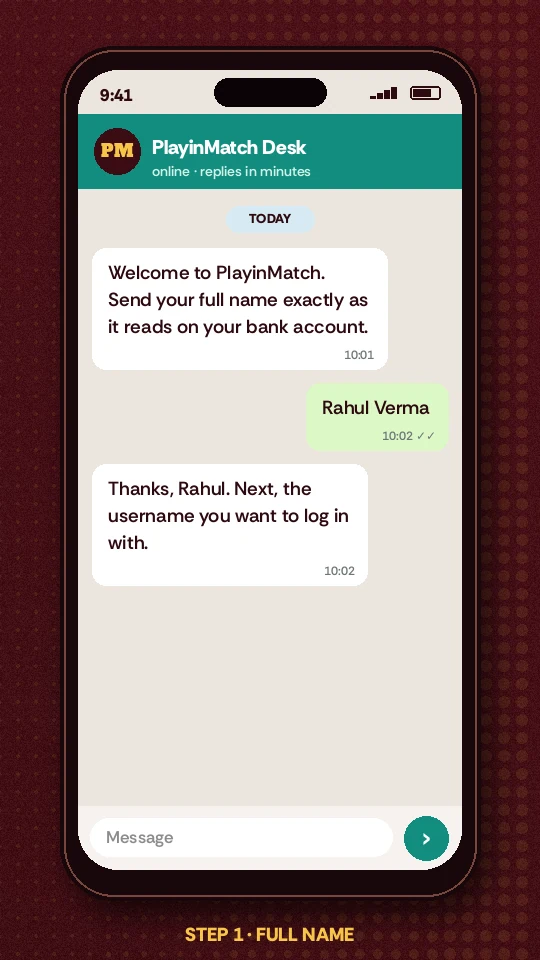
Screen 1: your name, as it appears on your bank account. 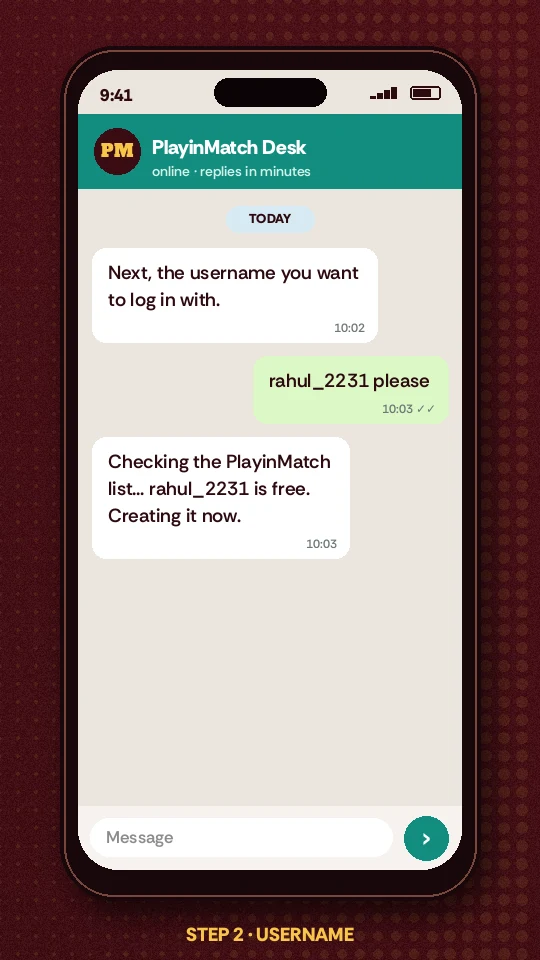
Screen 2: the username you would like to log in with. 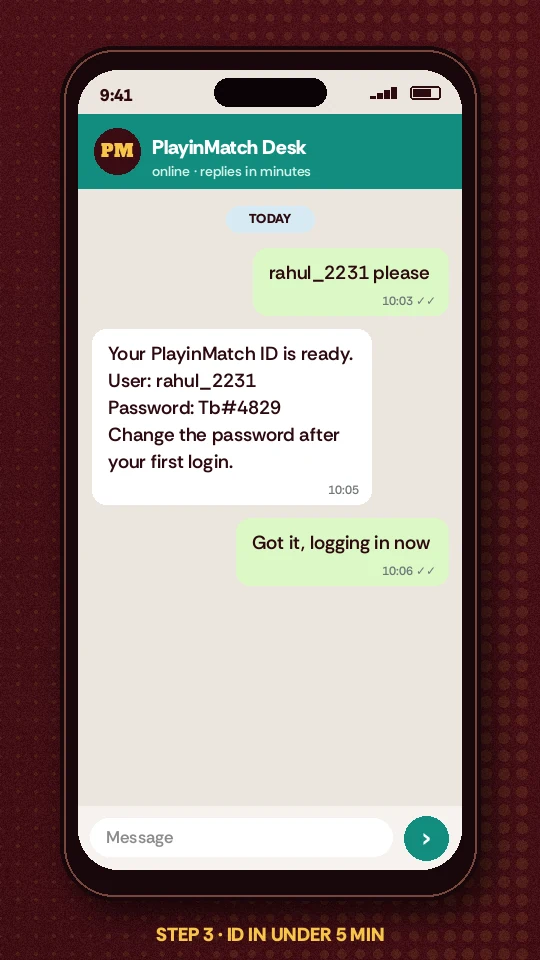
Screen 3: handle and starter password, back in the same thread.
Here is what each row of the chat actually needs from you:
- Pull up your passbook or UPI app and look at how it prints your name: initials, surname order, the lot. That printed version is what the PlayinMatch desk should receive.
- Send that name as message one. No emojis, no nickname, since the same spelling sits on the account for every payout that follows.
- Send the username you want. A second message. If you have a backup in mind, add it on the next line so the agent does not have to come back and ask.
- Put the phone down. Within about five minutes the PlayinMatch agent writes back with your handle and a starter password, both in one bubble.
- Copy the handle from that reply into the ticket-stub card near the top of this page. It opens the same popup the PlayinMatch login page with the sign-in steps describes, so there is no second system to learn.
Two messages. That really is the ask. No selfie, no long questionnaire, no ten-screen wizard to click through on a slow connection at 11 at night. People who join PlayinMatch this way tend to describe it as quicker than setting up a food-delivery account, which is probably fair.
Send the name and the username as two separate messages rather than one long line. Agents read the thread top-down, and a clean pair of messages is the reason the PlayinMatch reply comes back in minutes instead of turning into a back-and-forth.
One more thing about the username. It is the handle you will type every single time you sign in, so pick something you can remember on a bad day (not your full phone number, not a string of random digits you will lose). Short and lowercase works best on a phone keyboard.
Once the reply lands, three small jobs are worth doing in the next sixty seconds. Pin the message so it does not sink under family groups. Sign in once while the details are in front of you, because a typo in the password is much easier to spot now than next week. Then change that starting password. The PlayinMatch desk will never need it again, and neither should anyone else who happens to glance at your chat list.
Joining with a friend on the same evening? Each of you needs your own WhatsApp number for this. The desk ties the new ID to the chat it came from, so two people sending two names from one phone gets messy quickly, and one of you ends up with an account you cannot reach from your own device.
How Does the PlayinMatch Referral Code Pay? The Clear ₹300 Rule
The PlayinMatch referral code pays ₹300 to the person who shared it, and it pays once the friend who used it makes a first deposit of ₹1,000. The friend does not receive the ₹300; the referrer does. No deposit from the friend, no payout.
That is the whole rule. It sounds almost too short, so it helps to walk through who does what.
| Who | What they do | What they get |
|---|---|---|
| You, the existing PlayinMatch member | Share your referral code with a friend | ₹300 after the friend's first ₹1,000 deposit |
| Your friend, the new joiner | Types your code in the referral box or mentions it in the join chat | A PlayinMatch ID in the usual couple of minutes |
| The desk | Links the new account to your code | Credits the ₹300 once the deposit condition is met |
A worked example makes it concrete. Say Priya has had a PlayinMatch ID for a while and her college friend Karan wants one. She sends him her code. Karan opens the sign-up popup, fills in his name, number and password, and pastes Priya's code into the referral box before ticking the 18+ box. His ID arrives over WhatsApp. A few days later Karan makes his first deposit, ₹1,000. At that point Priya is due her ₹300. Karan gets nothing extra from the code itself, and that is by design.
What if Karan's first top-up had been smaller than ₹1,000? Hard to say from the rule as written. It ties the ₹300 to the friend's first ₹1,000 deposit, and whether two smaller top-ups add up is something to ask the desk before you promise a friend anything. Better to check than to argue later.
The code has to be attached when the friend joins, not afterwards. If your friend uses the chat route instead of the popup, the safest move is to have them paste your code into the same message as their name, so the PlayinMatch agent sees it before creating the ID.
Where does your own code come from? If you do not have it handy, ask in the same WhatsApp thread that issued your ID; the button in the sign-in card above opens that chat. Keep it somewhere easy to copy. Friends lose interest fast when you say you will send it later.
Where do referrals usually go wrong? Three places, going by how the rule is written.
- The friend joined first and mentioned the code a day later. By then the new PlayinMatch account exists without a link to you, so there is nothing for the ₹300 to attach to.
- The friend already had an ID and had deposited before. The payout hangs on a first deposit, and theirs has already happened.
- The code was copied with a missing character. Paste it rather than retyping it, and ask your friend to read it back if they joined over chat.
Sending your code to several friends is fine. As the rule reads, each referred friend is a separate case with their own first deposit, though if you are planning to bring in a whole cricket group it is sensible to confirm with the desk how multiple referrals are tracked before anyone signs up.
A small aside. The referral credit is money for the referrer, and like anything that sits in a PlayinMatch balance it follows the account's normal withdrawal rules, which are covered on the PlayinMatch withdrawal time page rather than repeated here.
PlayinMatch Signup Popup — Clear Notes on Name, Mobile and Referral Box
Not everyone wants to start in a chat. The PlayinMatch signup popup on this site asks for five things, and then it still hands you to a WhatsApp agent to finish, so think of it as a way to preare your details neatly rather than a separate route.
Box by box, this is what each one wants and why it matters:
- Full name. The label says it plainly: as on your bank account. A nickname here is the most common reason a later payout gets held for a check, so type the legal spelling, middle name included if your bank uses it.
- Mobile number. Use the number that has WhatsApp on it. The agent who confirms your PlayinMatch ID messages that number, and a landline or an old SIM means the confirmation goes nowhere.
- Password. There is a Show toggle beside it, which is handy on a phone keyboard where a single wrong character is easy to miss.
- Referral code. The one box you may skip. A friend's code goes here pasted, not retyped, because this box is what earns them the ₹300 described above.
- 18+ box. A tick confirming you are 18 or older and accept the site terms. Without it the popup will not move forward.
Press Reserve My PlayinMatch ID and the popup checks the form, then tells you to finish the ID on the the desk, where a WhatsApp agent confirms it. So the popup and the two-message chat meet at the same place. The difference is only in how you hand over your details.
A lot of people stop at that screen, thinking the job is done. It is not quite. The popup has checked your entries, but the PlayinMatch account itself is created by a person on the desk, so tap through to the chat when the popup offers it and stay with the thread until the ID arrives. If you close the tab and walk away, the details sit there unfinished. Then, a few hours later, you are the one wondering why no ID came.
Small thing, but it trips people up: the password you choose in the popup is yours from the start, whereas the chat route hands you a starting password to change. Either way, what you sign in with at the end is a username and a password, nothing more exotic.
| Detail | Two-message chat | Signup popup |
|---|---|---|
| What you send | Full name, then wanted username | Name, mobile, password, referral code, 18+ tick |
| Where the ID is confirmed | WhatsApp, same thread | WhatsApp, after the form is checked |
| Usual wait | Under five minutes | Under five minutes once the agent picks it up |
| Referral code | Mention it with your name | Its own box in the form |
Which is better? In practice the chat route is what most people pick, because it asks for less typing. The popup suits anyone who wants to see every requirement on one screen before committing, or who has a referral code and wants it in a proper box rather than buried in a message. Both land you at the same PlayinMatch sign-in.
After the ID comes through, a lot of new members install the app before anything else. The PlayinMatch app download steps cover that, and the same username and password work inside it.
When PlayinMatch Signup Stalls — Proven Fixes Before You Message Again
Most PlayinMatch signups finish without a hitch. When one does not, it is nearly always one of a handful of small things, and each has a fix that takes a minute.
No reply after five minutes. Five minutes is the usual time, not a promise to the second. Give it a little longer before doing anything. Then send one short follow-up in the same thread, something like "name and username sent above", instead of repeating the whole pair; a second full request can land in the queue as a new signup and slow both down.
The username is taken. Common handles go fast. The agent will usually suggest a variation or ask for another. Sending a backup on the line after your first choice, as the steps above suggest, saves that round trip entirely.
You spelled your name wrong. Say so straight away, in the same chat, before the ID is created. Fixing a name after the account exists is slower, and the name has to match your bank account for payouts to go through cleanly.
You typed the wrong mobile number in the popup. Then the confirming agent is messaging a stranger. Reopen the popup, enter the right number and submit again, or simply switch to the chat route from your own phone, which removes the problem.
Day eight, and the password is gone from memory. By a distance the most common message on this list. PlayinMatch resets start from the mobile you registered, then a code the desk sends you.
A composite of what the desk sees most weeks: someone joins on a Saturday afternoon, gets their PlayinMatch ID in three or four minutes, never changes the starting password, and messages on Thursday unable to sign in because the reply got buried under group chats. Pin the desk's reply the moment it lands. That one habit prevents half the trouble on this list.
And if your hesitation is about whether to sign up at all rather than how, the is PlayinMatch safe breakdown goes through the account and payout questions people raise before joining.
First Deposit After You Join PlayinMatch — the Reliable Order of Things
An empty wallet is a perfectly normal state for a brand-new PlayinMatch account. Your handle exists, the sign-in works, the lobbies open; the balance simply shows zero until you decide otherwise.
The first deposit comes later, when you choose. There is a minimum amount and a short list of accepted payment routes, and both are set out with their credit times on the PlayinMatch deposit and withdrawal timing page, which is the one to trust for exact figures because it is kept current. This page will not repeat the numbers; two places quoting the same limit is how people end up reading an old one.
What this page can tell you is the order that avoids trouble:
- Retire the desk's starter password on your first PlayinMatch visit, while the balance still reads zero.
- Check that the name on your PlayinMatch account matches your bank account letter for letter.
- Read the deposit minimum and methods on the timing page linked above.
- Make the deposit from an account in your own name.
If you joined with a friend's PlayinMatch referral code, your first deposit is what triggers their ₹300 once it reaches ₹1,000. Nothing extra is needed from you; the link was made when you signed up.
That is roughly it. Deposits made from a third party's account are the one thing that reliably causes a delay later, so the name check in the second row is not decoration. People skip it, and then they write in.
There is no deadline, either. Some members join PlayinMatch, install the app, browse the sports and casino lobbies for a week and only then top up. Nothing about the ID changes in the meantime.
PlayinMatch Signup Questions With Clear Answers
How do I join PlayinMatch?
Two WhatsApp lines do it. Line one carries your name in bank spelling; line two carries the handle you would like. A PlayinMatch agent answers in that thread with the username and a starter password, typically before five minutes pass. Rather type into boxes? The sign-up popup here takes the same details.
Do I need documents for PlayinMatch signup?
The join step itself asks only for your name and a chosen username, or the five popup entries if you use the form. What matters most is that your name matches your bank account exactly, since that name follows the PlayinMatch account to every later payout and a mismatch causes delays.
How does a PlayinMatch referral code work?
A member shares their code, the new friend enters it while joining, and the member receives ₹300 once that friend makes a first deposit of ₹1,000. The friend does not get the ₹300. The code must be attached at signup, in the popup box or in the join chat, not added later.
How long does it take to get a PlayinMatch ID?
Under five minutes is typical, counted from the moment your second line, the handle, reaches the PlayinMatch desk. A busy evening can add a bit. Silence past that point calls for a single nudge in the same thread; resending name and handle again risks opening a duplicate request.
Can I join PlayinMatch without WhatsApp?
Not completely. You can start in the on-site popup, yet the final confirmation of a PlayinMatch account is done by an agent over WhatsApp, on the mobile number you typed into the form. Without WhatsApp on that number, the popup has nowhere to send its handover.
What is the first deposit to start on PlayinMatch?
There is a set minimum and a short list of payment methods, both kept up to date on the PlayinMatch withdrawal time page with their credit times. Joining itself is free and needs no deposit. Deposit from a bank account in your own name so later withdrawals are not held.
Popular Searches From People Who Join PlayinMatch
- join playinmatch
- playinmatch signup
- playinmatch referral code
- playinmatch id kaise banaye
- playinmatch register whatsapp
- playinmatch login
- playinmatch new id
- playinmatch refer and earn
- playinmatch app download
Join PlayinMatch Ledger — Top Signup and Referral Code Terms
Three searches bring people to this booth, and each looks at one account from a different side. Join PlayinMatch is the chat side: a name in bank spelling, a wished-for handle, a reply inside roughly five minutes. PlayinMatch signup is the popup side, five entries on one screen that still end with an agent on WhatsApp. PlayinMatch referral code is the friend side, about who sent you and what they collect.
| Join PlayinMatch | Two messages, ID usually under five minutes |
|---|---|
| PlayinMatch signup | Five popup entries, finished by a WhatsApp agent |
| PlayinMatch referral code | ₹300 to the referrer after the friend's first ₹1,000 deposit |
Clear PlayinMatch Referral Code Terms at a Glance
- The code is entered by the new member while joining, never afterwards.
- The ₹300 goes to the member who shared the code.
- The trigger is the friend's first deposit of ₹1,000.
First-deposit limits and methods sit on the withdrawal timing page; this ledger only covers how to join, the signup inputs and the referral rule.