
PlayinMatch sign-in counter
PlayinMatch Login — Clear Route Back In When the Code Never Arrives
Sign in with three entries (username or linked mobile, password, and the four digits drawn in the code image) and press Check Details and Continue. Stuck because a reset or new-phone code never turned up? Message the WhatsApp desk; a fresh PlayinMatch code usually follows inside four minutes.
Try the PlayinMatch Login Form — Clear Preview of the Two Main Boxes
These two boxes are a preview; the working PlayinMatch login adds the four-digit code step underneath them.
PlayinMatch Login Field Map — Five Clear Callouts, Top to Bottom
Five things sit on the PlayinMatch sign-in screen. Three of them you must fill; the other two are there for when something goes sideways.
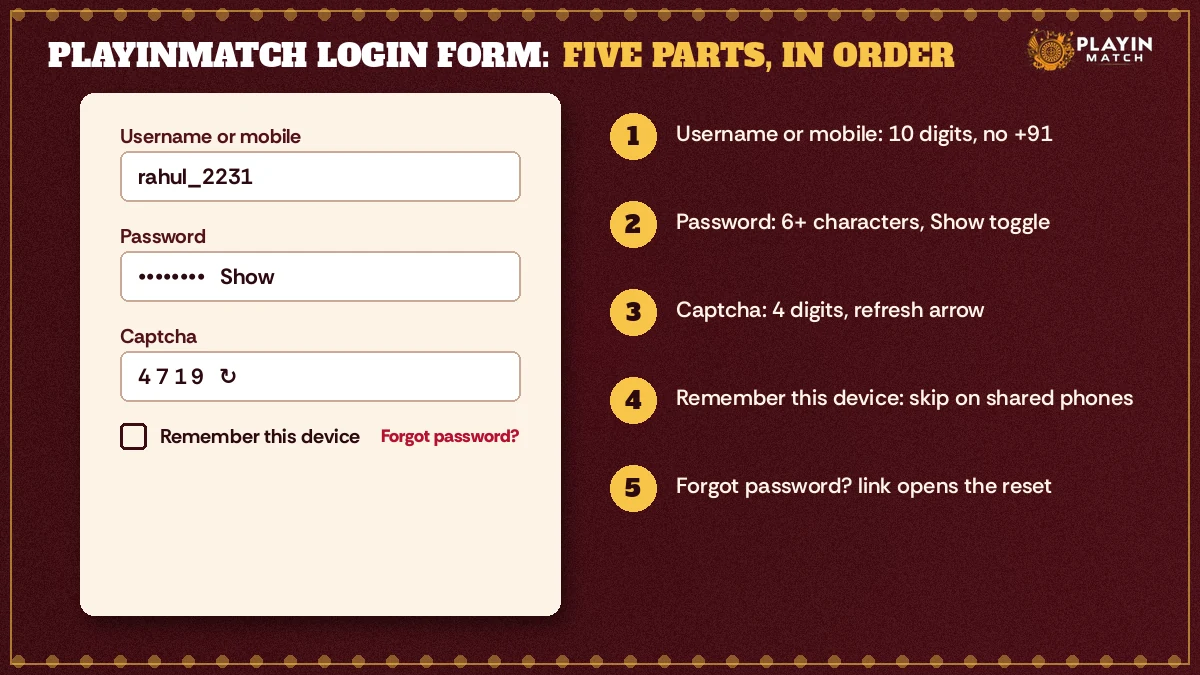
- Username or mobile number. Either one opens the same account. The username is the handle the desk issued with your ID; the mobile is the 10-digit number tied to it. Type the ten digits bare, without +91 or a space in the middle, because the form only accepts a username or a clean 10-digit number and will stop you with a prompt otherwise.
- Password. Six characters minimum. A Show toggle sits at the right edge of the box, and it is worth tapping once before you submit. Caps lock and a trailing space copied out of a chat message are probably the two most common reasons a correct PlayinMatch password gets refused.
- Captcha, four digits. A small image draws four numbers. Type them into the box beside it; the box stops at four characters. Cannot make out a digit? Tap the circular arrow and a new image loads, which costs you nothing.
- Remember this device. The replica shows this tick-box under the password. On your own phone it saves retyping the username. Borrowed phone, cyber cafe, a friend's laptop during a match night: leave it unticked.
- Forgot password? A text link below the fields. It swaps the sign-in form for the reset form, which asks for the registered mobile first and a 4-digit code second. That route has its own section further down.
Three wrong captcha codes in a row freeze the Check Details and Continue button for 30 seconds, and a countdown appears in in the form. That lock lives in this site's form only. Your PlayinMatch account is not touched, nothing is flagged, and after half a minute you simply try again with a fresh image.
Order matters less than people think. You can fill the password before the username if autofill jumps around, and the form checks everything together once you press the button. What it does care about is that each box holds the right kind of thing: digits in the code box, at least six characters in the password box, a username or a proper mobile number in the first one. Get those three right and the PlayinMatch form hands you on to the account.
On a phone the layout stacks vertically (same five items, same order), so the callout numbers still line up with what you see. If you mostly play from a phone browser, the PlayinMatch mobile login notes cover the small-screen quirks, such as the keyboard covering the code box.
First PlayinMatch Login on a New Phone — A Proven Six-Step Order
A first sign-in is where most of the friction sits. Nothing is saved yet, the browser has never seen the PlayinMatch address, and a new device brings one extra check at the end. Six steps, in this order:
- Keep the username the desk sent you within reach. No ID yet? That part happens over WhatsApp, and the join PlayinMatch page explains exactly what to send.
- Bring the form up with the Login button in the header bar of any PlayinMatch page, or with the preview card near the top of this one.
- Type the username, or the 10-digit mobile linked to the ID.
- Enter the password and tap Show once to check it.
- Read the four digits in the code image and type them into the box next to it.
- Press Check Details and Continue. On a device the account has not met before, expect a one-time code as a final check.
That last step catches people off guard. It should not, really: every new device gets the code once, and the reasons for it (along with when documents come into the picture) sit on the is PlayinMatch safe page. We keep those details there so they are stated once and stay correct.
A typical case from a match evening: someone moves to a new handset an hour before the toss, types the username right, the password right, and still gets stopped. Autofill had dropped the cursor into the password box a second time, so the four captcha digits went on the end of the password. One Show tap exposed it.
- Username or mobile
- The handle from the desk, or the 10 digits tied to the ID.
- Password
- Six characters or more, checked with Show.
- Booth code
- Four digits from the image; the arrow reloads it.
- Wrong code allowance
- Three, then a 30-second pause on the form.
- New device
- A one-time code, once per phone.
Browser or app makes no difference to the credentials. The same PlayinMatch username and password work in both, and the PlayinMatch app features page lists what the app adds on top of the browser version. If you switch between the two often, keep the remember tick on whichever device is yours alone.
Username or mobile, then: which should you use? Either works, but they fail differently. A username is short and easy to mistype by one letter, especially one with an underscore or a digit tacked on the end. A mobile number is harder to get wrong yet only helps if it is the number actually linked to the PlayinMatch ID; a second SIM you added later will not match. Most regulars settle on whichever they can type without looking, and that is a sensible rule.
Does PlayinMatch 365 Login Take the Same Reliable ID?
Yes. PlayinMatch 365 login uses the exact username and password you already have, on the 365 address instead of the main one. There is no second registration, no separate wallet and no new captcha rule: the same four-digit code, the same three-try allowance, the same Check Details and Continue button at the bottom of the form.
People usually end up searching for it because the word 365 appeared somewhere: a bookmark from months ago, a line in a chat, an old screenshot. They then assume it is another brand needing another account. It is not. One PlayinMatch ID covers both addresses.
If a page carrying the 365 name asks you to register from scratch instead of accepting your exsting PlayinMatch username, stop there and check with the desk before typing anything. The genuine 365 address takes your current details as they are.
What carries over, in practice: the username, the password, the linked mobile for resets, and whatever the desk has already set up on the account. What does not carry over is a remembered device. A browser that has never opened the 365 address treats it as new, so the code image appears fresh and, on a new phone, so does the one-time code. Mildly annoying. Expected, though.
Should you reset a password while signed in on one address, use the new password on the other too (both read the same account, so the old one stops working everywhere at once). That catches a few people out the first time they bounce between the main PlayinMatch login and the 365 one on the same evening.
Bookmark both addresses on the device you use most, then. When one is slow to open on a busy night, the other takes the same PlayinMatch details and you are not stuck retyping a URL from memory while an over runs.
Popular PlayinMatch Login Searches From the Same Sign-In Queue
- playinmatch login
- playinmatch 365 login
- playinmatch login id password
- playinmatch com mobile login
- playin match sign in
- playinmatch otp not received
- playinmatch password bhool gaya
- playinmatch login kaise kare
- playinmatch captcha code
- playinmatch new id
- playinmatch account band ho gaya
PlayinMatch Login Notes — Best Answers Folded Into Two Drawers
Searches for playinmatch login and playinmatch 365 login land on one account, one form and one reset route. The two drawers below hold the short version of each.
PlayinMatch login on the main address — clear points
A PlayinMatch login needs a username or the linked 10-digit mobile, a password of six or more characters, and the four digits from the code image. After three wrong codes the form pauses for 30 seconds.
- Username and mobile open the same PlayinMatch ID.
- The arrow beside the code image loads a new set of digits.
- Forgot password swaps in the reset form: registered mobile first, 4-digit code second.
- A new phone brings a one-time code once, as the safety page explains.
No ID at all? That starts on WhatsApp through the join page, not on this form.
PlayinMatch 365 login and resets — reliable side by side
| Item | Main login | 365 login |
|---|---|---|
| Username | Same | Same |
| Password | Same | Same |
| Code image | 4 digits | 4 digits |
| Reset route | Registered mobile | Registered mobile |
A password reset on either address changes it for both, since playinmatch 365 login reads the same PlayinMatch account as the main form.
Captcha Lock and Other PlayinMatch Login Messages — A Proven Fix for Each Line
Every PlayinMatch sign-in error you can hit before the account is even checked shows as a one-line message inside the form. Five of them, each with an obvious cause once you know where to look:
| Message in the form | What triggered it | Fix |
|---|---|---|
| Enter your username or 10-digit mobile. | First box empty, or a number with +91, spaces or a missing digit. | Type the handle, or exactly ten digits. |
| Password needs at least 6 characters. | Password box short or empty; sometimes autofill wiped it. | Retype and tap Show to confirm. |
| Code did not match. | One of the four captcha digits misread. | Tap the arrow for a clearer image, type again. |
| Locked for 30 seconds after 3 wrong codes. | Third miss on the captcha in a row. | Wait for the countdown; the account is fine. |
| Too many wrong codes. Wait a few seconds. | Button pressed again during the lock. | Let the timer finish, then use a fresh image. |
Notice the patern. Four of the five are about typing, and the fifth is just a timer. None of them mean your PlayinMatch ID has a problem.
So what does? If the form accepts everything (no red line, the button goes through) and the account still will not open, the password itself is wrong or the account has been put on hold. Wrong password is the reset section below. An account on hold is a desk conversation, full stop: the PlayinMatch customer care page lists the WhatsApp and Telegram routes, and a blocked ID is not something any form on this site can lift for you.
About the captcha digits: a 1 and a 7, or a 6 and an 8, get confused more than anything else. When in doubt, reload the image rather than guessing. A guess that misses counts toward the three, a reload does not.
One more quirk. Some phone keyboards open in letters mode on the username box, so a mobile number typed there fills with the wrong characters if you do not switch to digits. Minor, but it produces the first message in the table, and people read that message as the account being gone. It is not gone.
Telling a wrong password from a wrong code is easier than it sounds. A code problem always produces one of the messages in the table, right there in the form, and the digits box is the one that clears. A password problem gets past the form checks, since six characters is six characters to the form, right or wrong, and only shows up once the account is asked. So if the table's messages never appear and you still cannot get in, stop reloading captcha images. The PlayinMatch password is the thing to reset.
PlayinMatch Login OTP Not Arriving — Proven Checks Before You Message the Desk
A missing code is the most common reason people give up on a PlayinMatch login halfway. Two different codes get mixed up here, so first work out which one you are waiting for.
The first is the one-time code on a new device, which appears after the password step. The second is the reset code, requested from the Forgot password form when you cannot remember the password at all. Both go to the mobile linked to your PlayinMatch ID. Neither goes to a number you have added since, or to the phone you happen to be holding if the ID was set up on another SIM.
- Confirm the linked number. The reset form asks for it and accepts only 10 digits starting with 6, 7, 8 or 9. If the number you type is not the one on the ID, no code will come, whatever you do next.
- Look in the message folder your phone uses for unknown senders. Many handsets file one-time codes away from the main inbox.
- Request once, then wait a couple of minutes. Tapping repeatedly tends to queue several codes, and only the latest one works.
- Check the SIM actually has signal. Dual-SIM phones sometimes park the linked number in the slot that is switched off.
Two minutes gone, folder checked, signal fine, and still no code? Stop requesting. Leave the four code boxes open on screen and drop the desk one WhatsApp line: your PlayinMatch username and a word on which code went missing, new-device or reset. They push a fresh code or reset the password on their side, and whatever they send goes straight into those open boxes. About four minutes is normal. A crowded match night can stretch that, and nobody can fairly promise tighter.
Changed your number since you joined? Then no code will ever reach the old SIM, and repeated requests just waste time. Tell the desk the ID is linked to a number you no longer have. They handle the switch, and the reasons behind the device checks are laid out on the PlayinMatch safety page.
PlayinMatch Login Password Reset — The Clear Four-Minute Route
Forgotten passwords get fixed through the same form every time. It has two stages and takes a minute of typing, plus whatever time the code takes to arrive.
| Screen | What the PlayinMatch form says | You give | Button to press |
|---|---|---|---|
| 1 | Registered mobile first, then the 4-digit code. | The ten-digit number on the ID (starts 6 to 9) | Continue to the Code Step |
| 2 | Request the code, then type it below. | Four digits, one per box; the cursor advances itself | Verify the Code |
| 3 | Choosing the new password | Six or more characters, typed twice if asked | Sign in once straight after, as a test |
Want to change a password you still remember? Same route. There is no separate change-password screen to hunt for, so the reset form doubles as the change form, and the new password replaces the old one on the main address and the 365 address together.
- Stage one
- Registered mobile, 10 digits, starting 6 to 9.
- Stage two
- Four single-digit boxes that advance on their own.
- Code missing
- WhatsApp desk, roughly four minutes.
- After reset
- Old password stops working on both addresses.
A small habit that helps: once the new PlayinMatch password works, sign in again straight away on the device you use most, with remember ticked. If something is off (a typo you made while choosing it, say), better to find out now than at the toss of a big game when everyone is messaging the desk at once.
Worked through once, the whole thing looks like this. Mobile typed, Continue to the Code Step pressed, a minute of waiting with no message. Instead of pressing again, a quick WhatsApp to the desk with the PlayinMatch username. Fresh code inside four minutes, four digits typed, Verify the Code, a new password chosen and tested on the spot. Roughly six minutes end to end, most of it waiting.
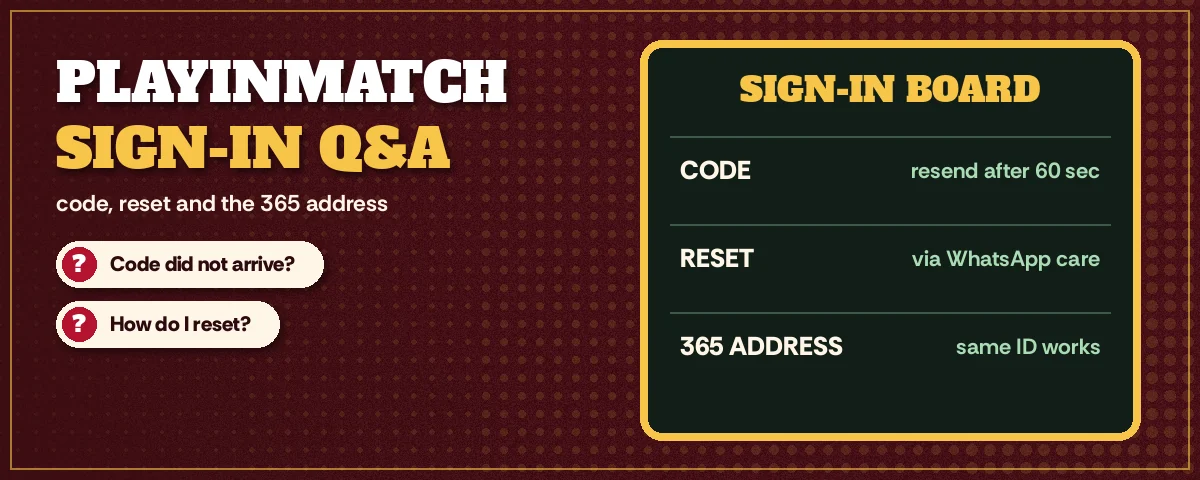
PlayinMatch Login Questions Players Ask Most — Clear Answers
What do I type to log in to PlayinMatch?
Type your PlayinMatch username or the 10-digit mobile linked to the ID, then your password of six or more characters, then the four digits shown in the code image. Press Check Details and Continue. A new phone adds a one-time code at the end, just once per device.
I forgot my PlayinMatch password. What now?
You recover it with the reset form, not a new ID. The link sits beneath the password box on the PlayinMatch sign-in form and wants the mobile the account was registered with, then a four-digit code. Set the new password after Verify the Code. If that code never shows, ask the WhatsApp desk for another.
Why is my PlayinMatch OTP not coming?
Most often the PlayinMatch code is going to the SIM linked to the ID, and that is not the one in your hand. Dual-SIM phones and old numbers cause most cases. Look in the unknown-senders folder, request a single time, give it two minutes. If the linked number is gone for good, the desk has to change it.
Can one PlayinMatch ID be used on two phones?
Yes, the same PlayinMatch username and password work on a second phone. That phone is new to the account, so it asks for a one-time code the first time you sign in there. Tick remember only on the phone that belongs to you, not on a shared or borrowed device.
Is PlayinMatch 365 login the same ID as the normal one?
It is the same ID. PlayinMatch 365 login accepts your existing username and password with no fresh registration. The browser treats the 365 address as new, so expect a new code image and possibly a device code. A page that demands a brand new account under that name should be checked with the desk first.
How can I change my PlayinMatch password?
Run the reset form even if you remember the current password. Enter the registered mobile, verify the four-digit code, then choose the new password. The change applies to both the main address and the 365 address at once, so update any saved password on every device you use.
Can I sign in to PlayinMatch with just my phone number?
Yes. The first box on the PlayinMatch sign-in form takes either the username or the 10-digit mobile linked to the ID. Type the number without +91 or spaces. You still need the password and the four-digit code, because the phone number only replaces the username, nothing else.