
PlayinMatch app · what it does on your phone
PlayinMatch App — Premium Alerts and UPI Top-Up to Bet on the Move
Bet from your phone with the PlayinMatch app: an alert tells you when a followed match opens, UPI top-up runs from the wallet without leaving the app, a score strip stays above your stake, and one tap moves you from cricket to the casino lobby. Android gets a 31 MB APK; iPhone uses Safari.

PlayinMatch App Sign-In: Your Proven Web ID Works Here Too
The app never hands out a second username. Type the ID and password you already use on the PlayinMatch website; alerts and the wallet only switch on after that first sign-in.
No ID Yet? Ask the Desk Before You Install the AppPlayinMatch App Features Players Rate Best — the Ticket Strip
Six things separate the PlayinMatch app from typing the address into Chrome every evening. None of them change your odds. None of them change your balance. What they change is the number of taps between an alert and a placed bet, which, on a phone held in one hand on a crowded bus, is most of the difference.
- Admit 01Match alertsFollow a fixture and PlayinMatch pings you when its market opens.
- Admit 02UPI top-upPay from the wallet screen; your UPI app sends you back afterwards.
- Admit 03Score stripThe running score stays pinned above the stake box.
- Admit 04Casino in one tapJump from cricket to Aviator or Andar Bahar tables and back again.
- Admit 05Fingerprint unlockOn phones that support it, skip the password after the first sign-in.
- Admit 06One walletThe same PlayinMatch balance on the app, the website and the iPhone icon.
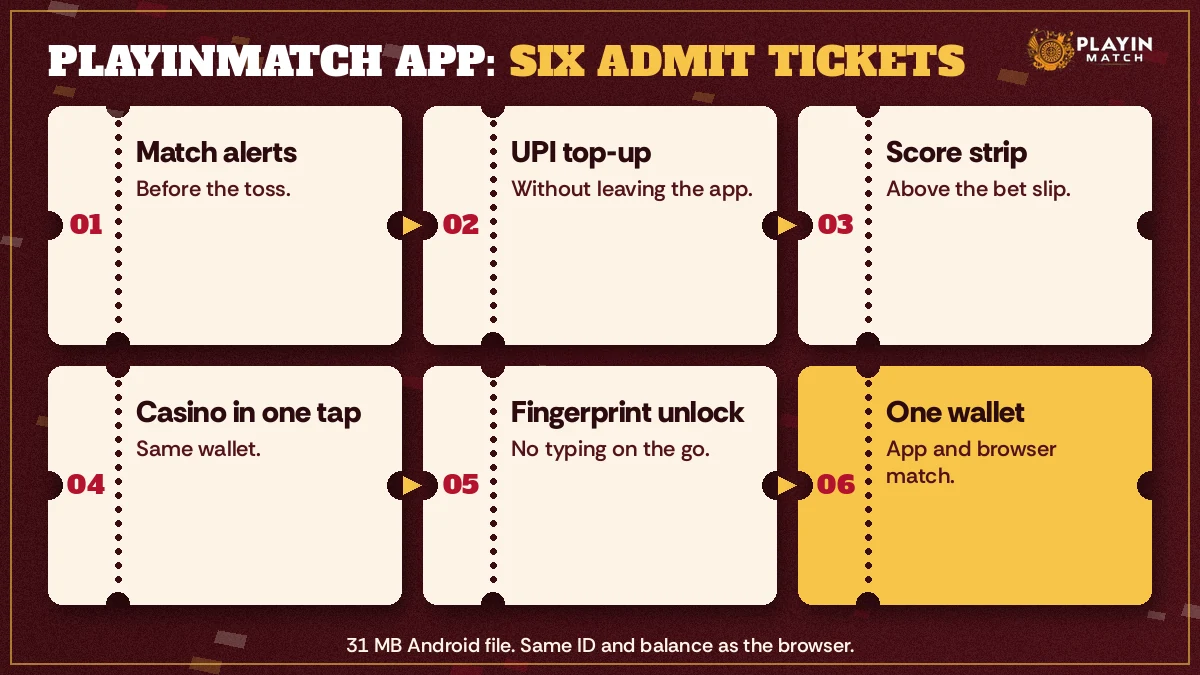
Which of the six matters most depends on how you play. Someone who only bets the evening chase will lean on alerts and the score strip. A player who drifts over to the casino between innings (the break is long enough for a few Aviator rounds, and short enough to forget the chase has restarted) will use the one-tap switch more than anything else. The wallet is the feature everybody ends up using, planned or not.
There are limits, too. The PlayinMatch app has no separate odds, no app-only price and no offline mode; every screen needs data. If a Telegram channel promies an app-only rate for PlayinMatch, it is not describing this build.
Premium PlayinMatch App Alerts and a Score Strip Above the Bet Slip
Alerts in the PlayinMatch app are opt-in. Two switches have to agree before one reaches you: the follow toggle on the match itself, and Android's notification permission for PlayinMatch. Phones on Android 13 or newer ask for that permission outright on first launch. Older ones grant it by default, which sounds convenient until a battery saver quietly takes it away again.
Following a fixture is a single tap on the match row. After that, the useful alert is the one saying the market for that match has opened, so you are not reopening the sportsbook every few minutes waiting for a price to appear. Account events, like a top-up landing in the wallet, arrive the same way. If you follow twelve matches on a Saturday you will get twelve pings; follow the two you actually care about.
No alert, and the match is already live? Usually that is battery optimisation. Open Android Settings, find PlayinMatch under Apps, set battery use to Unrestricted and confirm notifications are allowed. Xiaomi, Vivo, Oppo and Realme phones also hide an autostart switch that needs turning on for PlayinMatch, or the app sleeps the moment you lock the screen.
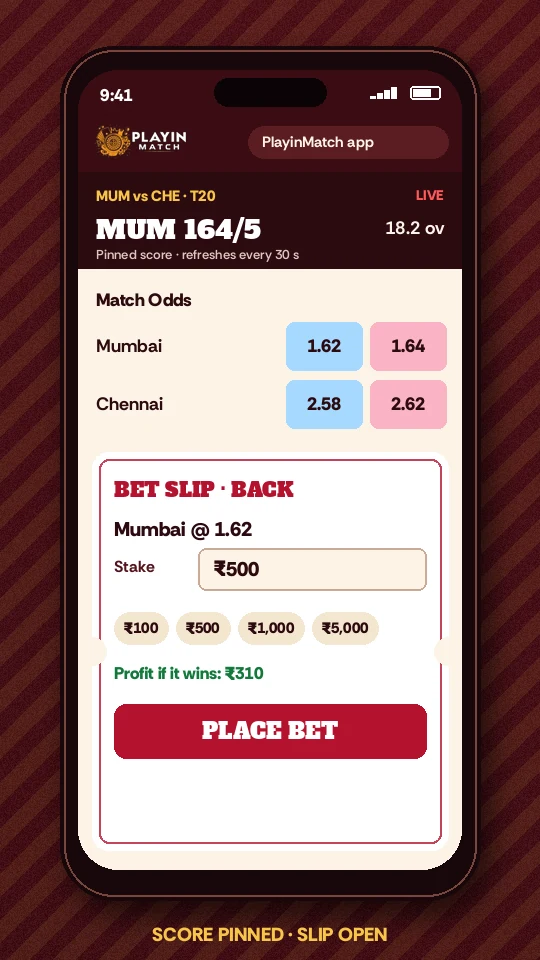
Second thing people notice, and probably the one they use most: the score strip. It is a thin line of match state, fixed above the bet slip, so the number you are betting on does not vanish the moment the stake keypad slides up. In a mobile browser you tend to scroll between scoreboard and slip. In the PlayinMatch app you do not.
Short version: it is a glance, not the full board. The complete PlayinMatch scoreboard, and how often it updates, lives on the PlayinMatch live score today page; open that when you want the detail and the strip when you just want the state of play.
Read the price on the slip, never on the strip. A price can move between your glance up and your confirm, and the PlayinMatch bet slip is the only place showing the figure your stake is actually placed against.
A typical case. A player in Nagpur follows an evening fixture over lunch and forgets about it. The PlayinMatch alert lands while he is stuck in a vegetable-market queue; he opens the app with his thumbprint, sees the chase on the strip, tops up by UPI from the wallet and places his stake before the queue moves. No browser tab, no password typed.
Reliable UPI Top-Up and a One-Tap Casino Lobby in the PlayinMatch App
Top-ups happen inside the PlayinMatch app. The wallet hands the payment to whichever UPI app you pick and brings you back once it is approved, so the match you were watching is still open behind it.
- From whichever match you are on, reach the PlayinMatch wallet and start a deposit; the match stays open underneath.
- Pick UPI. Your phone lists the UPI apps you have installed: Google Pay, PhonePe, Paytm or your bank's own.
- Approve with your UPI PIN inside that app. The PIN never passes through PlayinMatch.
- Switch back. The PlayinMatch wallet normally shows the credit within minutes; if it does not, keep the UPI reference number ready for the desk.
Money left your bank but the PlayinMatch wallet still shows the old balance? Do not pay a second time. UPI sometimes holds a transfer in a pending state for a while, and a repeat payment simply doubles the amount waiting to be matched. Take a screenshot of the UPI success screen with the reference number visible, send it to the desk, and leave the app open on the wallet. Usually a stuck top-up is sorted once that reference is matched, and a transfer that fails outright goes back to the paying account through UPI itself.
How small a first top-up can be, and which other rails (IMPS, bank transfer) the wallet takes, is kept on the PlayinMatch withdrawal time and deposit page, along with payout timing. Those numbers live in one place on purpose. Two copies means one of them goes stale.
One habit saves a lot of chat time: pay from a UPI account in your own name. PlayinMatch sends payouts by IMPS to the account in your name, and a mismatch between who paid in and who is cashing out is probably the likeliest reason a withdrawal gets held for a check.
Now the casino switch, the other half of this ticket. From any sportsbook screen in the PlayinMatch app, one tap opens the casino lobby, with PlayinMatch Aviator, Andar Bahar, Crazy Time and the slot shelf, and one tap returns you to the match you left. The full list of tables sits on the PlayinMatch casino page. Andar Bahar and Aviator both run free demo modes, handy for learning the controls on a small screen before real balance is involved.
Fingerprint or face unlock finishes the set. It only works if your phone already has a fingerprint or face registered, and only after one normal sign-in with your PlayinMatch password. Change that password later and expect the app to ask for it once more before the thumbprnt works again. Annoying, maybe, but it is the right way round.
PlayinMatch Install in a Clear Order on Android and iPhone
Two sibling pages own the installation detail: the PlayinMatch app download page holds the file, and the PlayinMatch APK install order page handles older copies and every screen in between. Here the aim is narrower. Every feature above assumes a PlayinMatch app that is signed in and allowed to send alerts, so the rows below stop exactly there.
Android PlayinMatch Install: Proven Route for the APK
The Android build is a 31 MB APK and needs Android 8.0 or newer. Check Settings, then About phone, before anything else. If the version begins with a 7, stop here and use the PlayinMatch website in Chrome instead; the file will not install, and no setting changes that.
- Download the APK from the PlayinMatch app download page in Chrome.
- Chrome flags the finished download, as it does with anything sideloaded. Keep the file only if the address bar read playin-match.org when you started it.
- Open the file. Android asks once whether Chrome may install apps; allow it and go back.
- Tap Install, then Open.
- First launch: type the PlayinMatch username you use on the site, then accept the notification prompt. Skip it and the match alerts described above never arrive.
iPhone PlayinMatch Install: Popular Safari Home-Screen Route
iPhone owners get the features on this page minus one. No App Store build exists (a listing borrowing the name belongs to someone else), so the PlayinMatch app on iPhone is a Safari icon on the home screen, and that icon, as the paragraph after the steps explains, is weak on alerts.
- Open the PlayinMatch website in Safari.
- Tap the Share icon.
- Scroll the share sheet and choose Add to Home Screen.
- Keep the name PlayinMatch, tap Add, then open the new icon and sign in.
Once added, the icon opens the site full screen with the same wallet, lobby and score strip. Alerts are the weak spot on iPhone. We would not count on push alerts from a home-screen icon, so either check the match yourself or keep alerts on an Android phone if you have one lying around.
PlayinMatch Install Errors and the Best Fix for Each
| What the phone shows | Likely cause | What to do |
|---|---|---|
| App not installed | An older PlayinMatch copy, or low storage | Uninstall the old copy, clear some space, run the file again |
| There was a problem parsing the package | Android below 8.0, or a download cut short | Check the version; re-download and compare the size with 31 MB |
| Play Protect warning | Any APK from outside the Play Store triggers it | Continue only if the file came from the PlayinMatch app download page |
| Wrong password on first open | The app uses your website ID, not a new one | Reset it from the forgot-password link on PlayinMatch login |
| No icon on the iPhone home screen | Steps done in another browser | Repeat them in Safari |
That fourth row is easy to hit if you signed up months ago on a laptop and let the browser remember the password for you. The reset form lives on the PlayinMatch login page; change it in the browser, note it somewhere, then open the app.
Messaging the desk about an install error? Send your Android version and the exact error text in the first message. That turns a ten-message chat into a two-message one.
PlayinMatch Live App: Is the Top In-Play Screen a Separate Download?
No. Search PlayinMatch live app and you arrive back at the same PlayinMatch app, because in-play betting is a screen, not a separate install. Open a match that has started and the live markets, the score strip and the slip share one view, on the same ID and the same wallet.
Fair question, though. Some betting brands have split their mobile product into a main build and a lighter one, so it is natural to assume a live version exists somewhere. For PlayinMatch it does not. One file, one icon.
What changes once a match goes in-play is the screen, not the app. Markets that have closed drop off, prices update while you watch, and the score strip starts earning its place. Kabaddi and football matches on the PlayinMatch live sports list behave the same way as cricket here.
| For live betting | PlayinMatch app | Mobile browser |
|---|---|---|
| Alert when a followed match opens | Yes | No |
| Fingerprint or face unlock | Yes, on phones that support it | No |
| Score strip fixed above the slip | Yes | Scroll between them |
| Works on Android older than 8.0 | No | Yes |
| Odds and wallet balance | Same | Same |
PlayinMatch Live App on a Weak Signal: Best Habits Mid-Match
In-play betting is where a patchy connection hurts, because the slip and the price both depend on the phone reaching the server at the right moment. A train through a tunnel, a lift, a packed stadium where every phone fights for one tower: all of these can leave a PlayinMatch stake in doubt.
So, a habit. If the slip spins and then the screen freezes, do not tap confirm again. Wait for the signal, then open My Bets or your bet history in the PlayinMatch app and see whether the first stake went through. Only if it is missing do you place it again. Repeating the tap blindly is how people end up with two identical bets on the same over and no memory of choosing that.
Switching to mobile data when the Wi-Fi keeps dropping is fine, by the way. A steady 4G signal usually beats a café network that reconnects every few minutes.
If anyone forwards a file named PlayinMatch Live APK on Telegram or WhatsApp that did not come from our download page, leave it alone. There is only one build. A second file carrying the name is at best an old copy and at worst something that wants your password.
PlayinMatch 365 App: Same Account, Same Wallet, One Reliable Build
Yes, it is the same account. A PlayinMatch 365 app search leads back to the one PlayinMatch app; there is no separate 365 build and no separate 365 ID. Username, password and wallet stay identical whether you call it the app, the live app or the 365 app, and signing in on one does not create anything new.
Why does 365 turn up at all? Probably habit. Plenty of cricket-exchange names end in 365 or 99, and people type the pattern without thinking. PlayinMatch99 is a genuine alternate name of ours and the site answers to it. 365 is not one of our names, which is exactly why a file carrying it deserves a second look.
Three checks before you trust any PlayinMatch file, whatever it is called:
- It came from the PlayinMatch app download page, not a link someone forwarded.
- Its size is close to 31 MB. Far smaller or far bigger means a different file.
- On first open it asks for your existing PlayinMatch ID, not a fresh sign-up paired with a deposit request.
Already installed something called PlayinMatch 365 from elsewhere? Uninstall it, change your PlayinMatch password from the login page, then put the proper build on. Ten minutes tonight is cheaper than an argument about a missing balance later.
Popular PlayinMatch App Questions, Answered Short
What can I actually do inside the PlayinMatch app?
Everything the website does, plus a few extras. You can bet on cricket and other sports, top up by UPI from the wallet, open the casino lobby in one tap, follow matches for alerts, keep a score strip above the bet slip and unlock with a fingerprint on supported phones.
Is the PlayinMatch live app different from the normal app?
No, it is the same app. Live or in-play betting is a screen inside the one PlayinMatch build, not a second download. Open any match that has started and the live markets, score strip and bet slip appear together, using the same ID and the same wallet balance.
Does the PlayinMatch 365 app use my existing account?
Yes. There is no separate PlayinMatch 365 app or 365 ID; the search leads to the same build and the same login. If a file named PlayinMatch 365 reached you from somewhere other than the download page, uninstall it and change your password as a precaution.
Will the PlayinMatch app send me alerts before a match?
It can, once you follow the match and allow notifications for PlayinMatch in Android settings. Alerts are opt-in. If nothing arrives, set the app battery use to Unrestricted and turn on autostart on Xiaomi, Vivo, Oppo or Realme phones, then follow the match again.
Can I add money without leaving the PlayinMatch app?
Yes. The wallet inside the PlayinMatch app hands the payment to your UPI app, you approve it with your PIN there, and you land back in PlayinMatch with the credit usually showing within minutes. Minimum amounts and other deposit rails are listed on the withdrawal time page.
Top PlayinMatch App Searches Players Type
- playinmatch app
- playinmatch install
- playinmatch live app
- playinmatch 365 app
- playinmatch app download
- playinmatch apk
- playinmatch app kaise chalaye
- playinmatch app me deposit kaise kare
- playinmatch iphone app
- playinmatch app alerts
PlayinMatch App Ledger: Premium Features, Install, Live and 365 Builds
One ID, two ways in: an Android build and an iPhone icon. That is the whole PlayinMatch app, sized for someone betting in short bursts from a phone, where every saved tap counts for more than screen size.
Premium PlayinMatch App Features at a Glance
Five features carry the PlayinMatch app, and each one removes a step you would otherwise take in a mobile browser:
- Opt-in match alerts for fixtures you follow.
- UPI top-up from the wallet, with a return to the app once approved.
- A score strip fixed above the bet slip.
- A one-tap switch between the sportsbook and the casino lobby.
- Fingerprint or face unlock after the first password sign-in.
Balance, odds and markets do not differ between the app and the website. Only the route to them gets shorter.
PlayinMatch Install, Live App and 365 App: Clear Differences
A PlayinMatch install asks for little. Android needs version 8.0 or later and space for 31 MB; iPhone needs three taps in Safari, Share and then Add to Home Screen, since no App Store version exists.
Typing PlayinMatch live app into a search bar gets you nothing new to install. Tap a fixture once play has begun and the the build you already have switches into its in-play layout by itself.
The PlayinMatch 365 app is a search habit rather than a product: the same account, the same wallet and the same single build, whichever name brought you here.