
PlayinMatch Android file · 31 MB
PlayinMatch APK — Proven Way to Spot a Fake Build and Stay Safe
Check two numbers before you install the PlayinMatch APK: the file should read 31 MB, and your phone has to run Android 8.0 or newer. Anything heavier, lighter or copied from a forum is not the current build, so delete it, fetch a fresh copy and only then sign in.
PlayinMatch APK Owners: Proven Password Test Before Reinstalling
Your balance belongs to the PlayinMatch account, not to the handset. Prove the username and password still work in the browser first, and removing an old APK afterwards costs you nothing.
PlayinMatch APK File Facts: A Clear 31 MB and Android 8.0 Benchmark
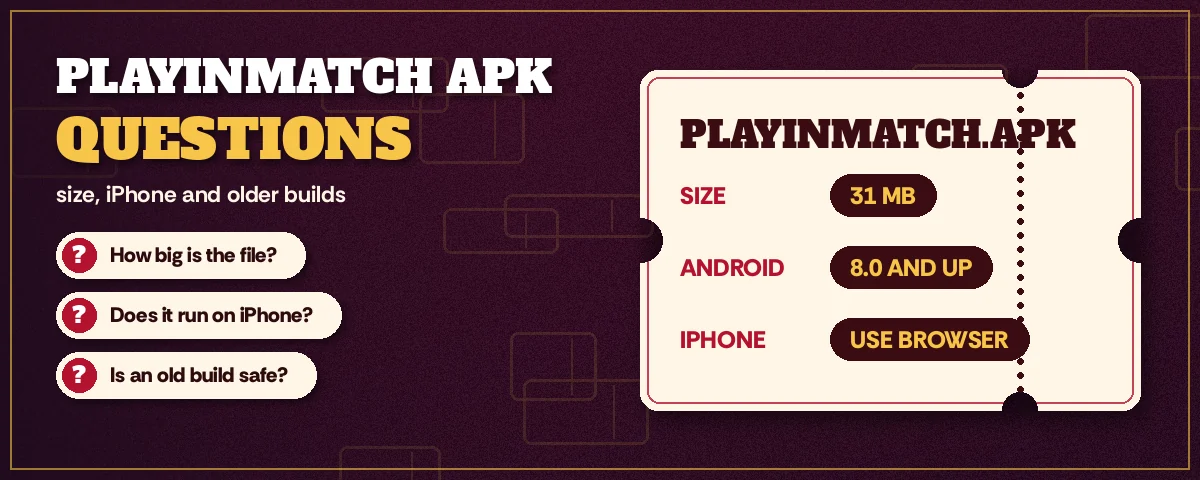
Two numbers do most of the checking for you. The current PlayinMatch APK weighs 31 MB, and it will not install on anything older than Android 8.0.
That sounds almost too simple. It isn't. Nearly every broken PlayinMatch install traces back to one of those two numbers being wrong, either a file that is visibly lighter or heavier than it should be, or a phone that is a couple of Android versions behind. There is no compressed edition, no lite edition and no extended edition. If a download calls itself the PlayinMatch APK and the size is off, treat it as a different file that happens to borrow the name.
| What to check | Correct value | Where you see it |
|---|---|---|
| File size | 31 MB | Files app or Downloads, long-press the file, then Details |
| Android version | 8.0 or newer | Settings, About phone, Android version |
| iPhone | No APK at all | Safari, Share, Add to Home Screen |
| Where the link came from | The desk, via the booking link | Your own chat history, not a forum thread |
Why check the Android version before downloading rather than after? Because a phone on 7.x will throw a parse error, or simply say the app was not installed, and nothing in the settings changes that. You would have spent 31 MB of data for nothing. On an older handset the better route is the browser: the PlayinMatch login page opens the same account, same wallet, in Chrome.
This page does one job, which is telling a good file from a bad one. The actual download screen, the permission prompt and the first launch are covered on the PlayinMatch app download walkthrough, so they are only touched on here where the check depends on them.
Proven PlayinMatch APK Install Order, From Uninstall to First Sign-In
Order matters more than people expect. Install the new PlayinMatch APK on top of an old forum copy and Android may keep the old one's data, or refuse the update because the two files were signed differently. Clearing the ground first avoids both problems.
- Uninstall the old copy. Settings, Apps, PlayinMatch, Uninstall. Your balance stays with the account; only the phone's copy goes.
- Download the current file. Use the link the desk sends you through the booking page, and let it finish completely before touching it.
- Measure before tapping. Long-press the finished download and read its details. Anything other than 31 MB goes straight to the bin, and you message the desk for a fresh link.
- Grant one permission. The first tap on a sideloaded file makes Android ask whether Chrome, or whichever app opened it, may install unknown apps. Say yes for this PlayinMatch install only.
- Install from the measured file. Tap the same file you just checked, not a second copy with a similar name, and accept the prompt. When Android finishes, it offers to open PlayinMatch straight away.
- Sign in and check the captcha. The current build shows a captcha on the login screen. No captcha means the wrong file got through somewhere.
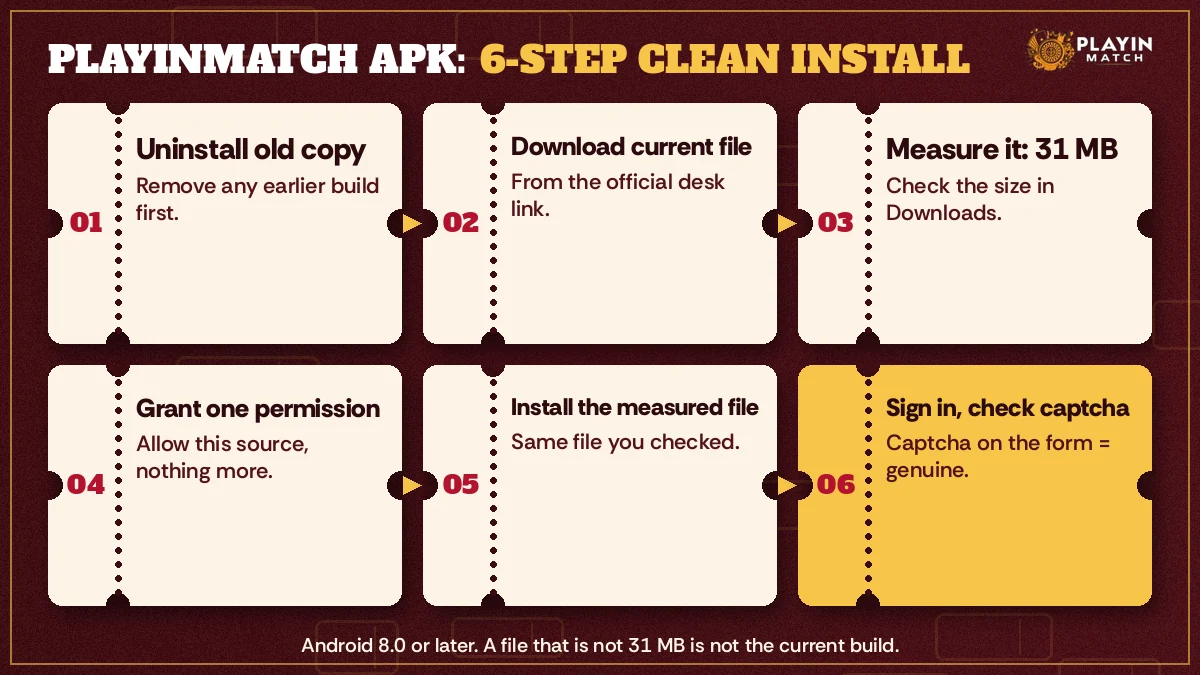
Step three is the one people skip. It takes about ten seconds, and it is the only step that actually proves you have the right PlayinMatch file rather than one that merely looks right. Everything after it assumes the size matched.
(If Downloads shows the same file twice, one with a (1) tacked onto its name, Chrome simply saved a second attempt. Measure both. Keep whichever reads 31 MB and bin the other before step five.)
Clear Fixes When the PlayinMatch APK Refuses to Install
Three messages cover most failed installs, and each points somewhere specific.
App not installed. This one tends to mean a forum copy was never fully removed, and Android will not lay a differently signed PlayinMatch build over it. Remove it from Settings, reboot, then tap the 31 MB file again. Still refusing? Assume the download got corrupted on the way and pull it again over Wi-Fi.
There was a problem parsing the package. Two suspects. A download that stopped early shows up as a file lighter than 31 MB; a phone still on Android 7 fails the 8.0 floor. Size is quicker to read, so rule that out before digging into the version screen.
Play Protect warning. Android shows this for most files installed from outside the Play Store, so on its own it is not proof of anything bad. What matters is the size and where the link came from. If both are right, tap install anyway. If the size is wrong, cancel, full stop.
Low storage is the rarer culprit. For a moment during setup the 31 MB PlayinMatch file and the unpacked app both sit on the phone, so a handset down to its last few megabytes can stall halfway. Clear out some cached video first.
Reliable Way to Read the PlayinMatch APK File Size on Any Android
Menus differ by brand, which is annoying. On stock Android and most Motorola or Nokia phones, the Files app shows the size right under the file name in Downloads. Samsung's My Files hides it one tap deeper, in the Details sheet. Xiaomi, Redmi and Poco phones show it in the File Manager list view, though sometimes rounded. Rounded is fine; you are looking for 31 MB, not a precise byte count. What you are really checking is whether the number is in the right place or wildly out.
A user in Nagpur had two files in Downloads with almost identcal names, one from the desk and one from a group chat. Only the size told them apart. The lighter one was the group-chat copy, and it would have been the one tapped first.
Popular PlayinMatch APK Searches From Android and iPhone Users
- playinmatch apk
- playinmatch apk old version
- playinmatch apk latest version
- playinmatch live apk
- playinmatch app download apk old version ios
- playinmatch app download kaise kare
- playinmatch apk 31 mb
- playinmatch apk purana version
- playinmatch app iphone me
- playinmatch apk install nahi ho raha
Top PlayinMatch APK Search Terms, Each With a Clear Answer
Behind all five phrasings sits one worry: which PlayinMatch APK can I trust, and what are all those other copies? Someone typing playinmatch apk should finish with a single 31 MB file running on Android 8.0 or newer. The person after the the playinmatch apk latest version lands on exactly the same file, since PlayinMatch serves only one current build at any moment.
How each search term maps to the one current PlayinMatch file
- Measure the file: 31 MB is the only size that counts as the current PlayinMatch APK.
- Confirm the phone runs Android 8.0 or later before downloading anything.
- Look for the captcha on the login screen after installing; the current build shows it.
- iPhone owners download nothing; the PlayinMatch icon comes from the Safari share sheet.
- playinmatch apk old version
- Old forum copies lack the captcha and have been linked to wallets freezing at login. Delete, do not install.
- playinmatch live apk
- No separate live build exists. In-play sports sit inside the same PlayinMatch app.
- playinmatch app download apk old version ios
- An APK cannot run on iOS, old or new. iPhone users pin the site from Safari instead.
So the short version: one Android file, one size, one source. Anything labelled old, live, modded or iOS-ready that does not match the 31 MB PlayinMatch APK is worth deleting before it gets anywhere near your password.
PlayinMatch APK Old Version: Why the Best Copy to Keep Is None
Why would anyone want the PlayinMatch APK old version? A slow evening on the new one, perhaps, or a handset that balked at the update, or a forum post insisting the earlier build was lighter.
None of those reasons survive contact with what the old copies actually do. Most of them circulating on forums and group chats fail the size test straight away. The ones that do install tend to open to a login screen without the captcha, which is the first visible sign that the PlayinMatch app on your phone is not what the desk is serving today. And the worst outcome, the one that brings people to the desk in a mild panic, is a wallet that freezes the moment you sign in from that old build.
A frozen wallet is not lost money. That point matters, so it is worth putting a second way: the balance is still on your PlayinMatch account, and the desk can see it. But getting it moving again means a conversation, a switch to the current file and a fresh sign-in, all of which you could have skipped by never installing the forum copy in the first place.
PlayinMatch APK Version Receipt: Proven Current Build Against an Old Forum Copy
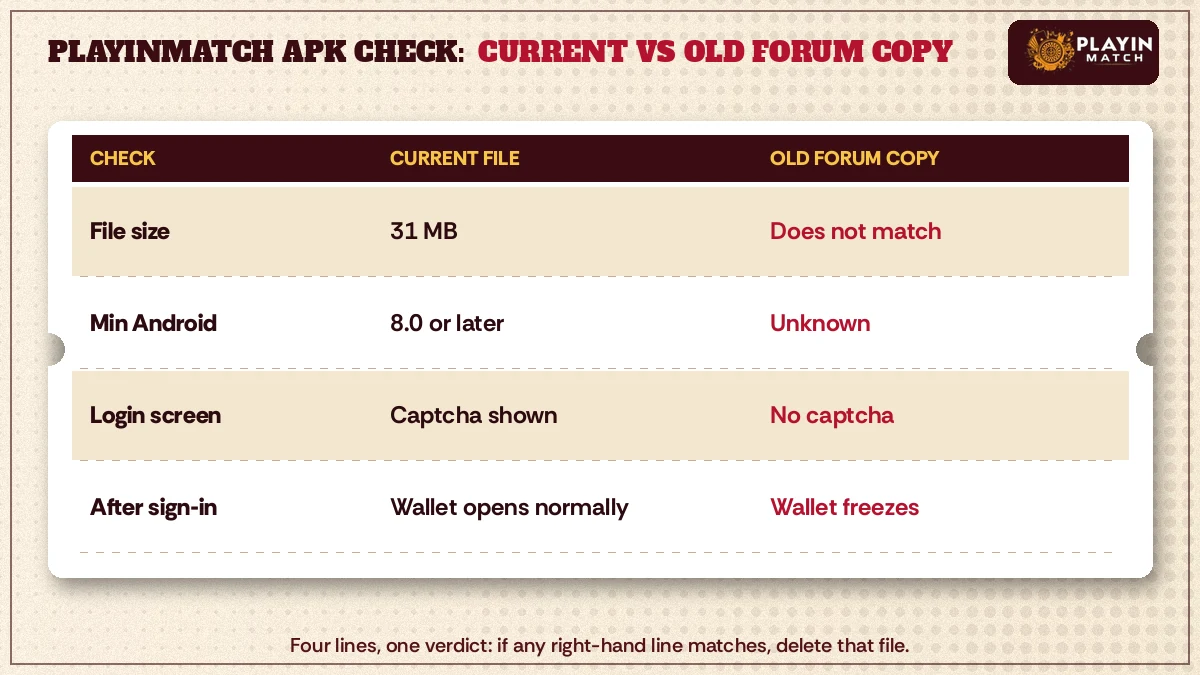
- File size
- Current: 31 MB. Old forum copy: does not match, sometimes by a lot.
- Minimum Android
- Current: 8.0 or newer. Old forum copy: unknown, whatever the uploader built.
- Login screen
- Current: captcha shown before sign-in. Old forum copy: no captcha.
- After sign-in
- Current: wallet opens normally. Old forum copy: wallet can freeze at login.
- Where it came from
- Current: the link the desk sends you. Old forum copy: a repost with no traceable owner.
- What to do
- Current: keep it. Old forum copy: uninstall, then follow the six-move order above.
What about an old phone that genuinely cannot take the current build? Then an old APK still is not the answer. If the handset is below Android 8.0, the PlayinMatch browser version is the fallback, and it reaches the same account without any file at all.
PlayinMatch APK Latest Version: Proven Signs Your Build Is Current
Type PlayinMatch APK latest version into a search bar and the first page fills with mirror sites, each promising a fresher build than the last, each with an oversized download button and a changelog nobody at PlayinMatch ever wrote. Those pages can claim anything, because a sideloaded file carries no visible version label before you open it. What decides the matter is plainer: weight, login screen, origin of the link.
First, the size. 31 MB. Second, the captcha on the login screen, which the current PlayinMatch build shows and the old copies do not. Third, the source: a link that arrived in your own chat with the desk, not a file somone forwarded. If all three line up, you have the latest build, and there is nothing newer hiding somewhere else on the internet.
Still unsure? Ask the desk which build is current and compare it with what you installed. It is a short message, and it settles the question better than any third-party download page can.
In practice, updates are handled the same way as a first install. You uninstall, fetch the new file, check the size and install. Trying to install over the top sometimes works and sometimes produces the "App not installed" message, so the clean route is simply more predictable. The account, and everything in the PlayinMatch wallet, is untouched by any of this.
One more thing. If you already have the current build and it works, you do not need to hunt for an update every week. Keep it until the desk tells you a new file is out, or until the login screen starts behaving differently.
PlayinMatch Live APK: What This Popular Search Really Leads To
Short answer: there is no separate PlayinMatch live APK.
The word "live" in that search usually comes from people who want in-play cricket markets on their phone and assume they need a special build for it. They do not. In-play sports sit inside the same PlayinMatch app as everything else, behind the same login, drawing on the same wallet. One file covers pre-match, in-play and the casino side. Features are listed on the PlayinMatch app features page if you want to see what sits where.
This matters for safety more than convenience. A file advertised as the PlayinMatch live APK, with its own download page and its own size, is by definition not something the desk sends out. It might be harmless junk. It might be built to collect whatever you type into its login box. Hard to say from the outside, and there is no good reason to find out.
The rule does not change: if it is not 31 MB and did not come from your own chat with the desk, it is not the PlayinMatch app, however it is labelled.
PlayinMatch App Download APK Old Version iOS: A Clear Answer for iPhone
Short version: there is nothing to download. The typical person behind this search has just swapped an old Android handset for an iPhone and wants the same PlayinMatch setup back. Good news, then. The account moves across on its own. Sign in on the iPhone with the username you already have, enter the OTP that a new device triggers, and the balance you left on the Android phone is sitting there waiting.
PlayinMatch does not have an App Store listing either. What iPhone owners do instead takes about half a minute:
- Type the PlayinMatch address into Safari, since the pin option below lives in its share sheet.
- Tap the Share icon at the bottom of the screen.
- Scroll the sheet and choose Add to Home Screen, then confirm.
The result is an icon on the home screen that opens PlayinMatch full-screen, logs in with the same username and password, and shows the same wallet. It is not an app in the App Store sense, and it does not need updating; the site behind it is always the current one. That last point is actually the neat part for iPhone users: the whole old-version-versus-latest-version question simply does not apply to them.
If someone sends an iPhone user a configuration profile or a "signed IPA" claiming to be the PlayinMatch app, decline it. Installing profiles from strangers gives them a surprising amount of control over the phone, and it is not how PlayinMatch reaches iOS.
Reliable PlayinMatch APK Safety: OTP, File Source and First Sign-In
A fake APK mostly wants one thing from you: the code that arrives by SMS when a new device signs in.
PlayinMatch asks for an OTP every time your account is opened on a device it has not seen before. Installing a fresh APK counts, so you should expect that code after every reinstall. Type it into the PlayinMatch app yourself and nowhere else. The desk will never ask you to read it out, forward it or paste it into a chat, and anyone who does ask is not the desk.
The full account-protection picture, including when identity documents come into play for withdrawals, lives on the is PlayinMatch safe page, so it is not repeated here. The APK-specific habits are narrower:
- Take the PlayinMatch APK link only from your own chat with the desk, through the booking page.
- Measure the size before tapping install. 31 MB, every time.
- Do not install a file that someone sends as an attachment, even from a friend who "already uses it".
- Leave Play Protect switched on. Approve the single install when the file checks out; do not turn scanning off for good.
- After a reinstall, confirm the captcha appears on the login screen before entering your password.
That is really all there is to it. Five habits, and most of them take seconds. The one that probably saves the most grief is the size check, which is why it keeps coming up on this page; a wrong-sized PlayinMatch APK is the earliest point at which a bad file can be caught, before it has seen a password or an OTP.
PlayinMatch is for adults 18 and over. Decide your own spending limit before the first match you play on a fresh install, and keep to it.
Top PlayinMatch APK Questions From Android Owners
Is the PlayinMatch APK safe to install?
Yes, when the file is the current build: 31 MB, installed on Android 8.0 or newer, and downloaded from the link the desk sends you. Android may show a Play Protect notice because the file comes from outside the Play Store. Any copy with a different size should be deleted.
Can I download the PlayinMatch APK old version instead?
You should not. Old forum copies of the PlayinMatch APK usually fail the size check, skip the captcha on the login screen and have been linked to wallets freezing at sign-in. If your phone is below Android 8.0, use the browser version rather than an older file.
How do I know I have the PlayinMatch APK latest version?
Three checks confirm it. The file measures 31 MB, the login screen shows a captcha before you sign in, and the download link came from your own chat with the desk. If all three match, you have the current PlayinMatch build and nothing newer exists elsewhere.
What gives away a counterfeit PlayinMatch APK before I tap install?
Start with the size in your Downloads folder, because a fake rarely matches 31 MB. Then look at where it came from: forums, group chats and download sites are not sources the desk uses. After installing, a missing captcha on the PlayinMatch login screen is the final giveaway.
Is there a separate PlayinMatch live APK for in-play cricket?
No. In-play markets, pre-match markets and casino games all sit inside the same PlayinMatch app, under one login and one wallet. A file sold as a special live build is not issued by the desk, so skip it and install the standard 31 MB PlayinMatch APK instead.
Does the PlayinMatch APK work on an iPhone?
It does not, and no iPhone file of any kind exists. PlayinMatch reaches iOS through Safari instead: open the site, use the Share menu, choose Add to Home Screen. Sign in there with your existing details. The icon always loads the current PlayinMatch version, so there is never an update to chase.