
PlayinMatch Android build · 31 MB
PlayinMatch App Download — Reliable Sideload for Samsung, Vivo and Redmi
Get PlayinMatch onto Android by sideloading a single 31 MB file: confirm the phone runs Android 8.0 or later, let the browser install it, clear your brand's security prompt, then sign in with your web ID. iPhones take no file at all; Safari adds a home screen icon instead.
Check Your PlayinMatch Login Before the Reliable App Download
The installed app asks for exactly these two fields, so confirm they work on the site first and the first launch takes seconds.
Send me the Android 8.0+ install filePlayinMatch Download APK: the Proven 31 MB Build and Who Can Run It
Two numbers decide whether the PlayinMatch app download works on your handset: 31 MB for the file and Android 8.0 as the oldest system it accepts.
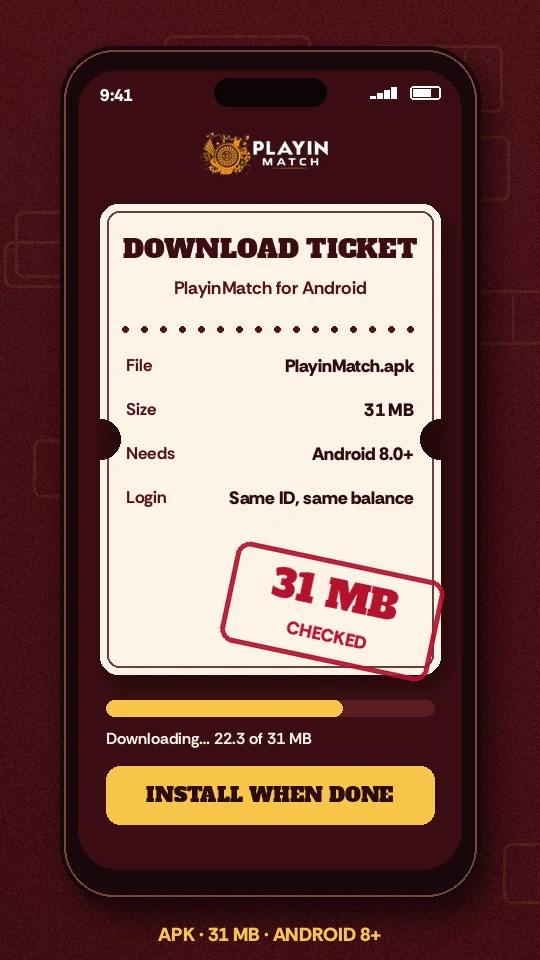
Everything else is detail. If your phone runs Android 8.0 (Oreo) or anything released after it, the PlayinMatch APK will install. Older than that and Android refuses the package outright, usually with a short message about the app not being compatible, and no setting will change the answer.
To find your version, open Settings, scroll to About phone, and look for Android version. Samsung tucks it one level deeper under Software information. Vivo shows it on the first About screen. Redmi and other Xiaomi phones list the Android number just below the MIUI or HyperOS version, which people often confuse for it (they are two different numbers).
Then the file itself. A PlayinMatch download that finishes at 31 MB is the full build. Much smaller, and the transfer was probably cut off by a weak signal; tap the link again rather than trying to open a half file. Much bigger, and you have downloaded something else entirely, so delete it.
Mobile data works, though a flaky 4G signal is the main reason people end up with a broken PlayinMatch file. On Wi-Fi the 31 MB download finishes in well under a minute on most home connections. On a train or in a basement it may crawl, stall, and save an incomplete copy. A rule of thumb: if the bar sits still for more than a few seconds, cancel and retry somewhere with a steadier signal.
Keep noticeably more than 31 MB free. Android copies the package, unpacks it, and only then clears the original, so for a moment both sit in storage together.
File name, build notes and the checksum-style details live on the PlayinMatch APK file page. This page stays with the job of getting that file onto a phone and opened.
PlayinMatch App Download APK in Seven Reliable Taps
Chrome is assumed below because it ships on almost every Android phone sold in India. Other browsers follow the same shape with slightly different wording on the prompts. Budget roughly two minutes on a decent connection; most of that is the download bar.
- Tap the PlayinMatch download button on this page. The link opens in Chrome and the 31 MB file starts downloading.
- Before a single megabyte arrives, a strip at the bottom of Chrome questions the file type. It shows for any package Google did not deliver, so choose Download anyway and watch the PlayinMatch progress bar climb.
- Download done? Pull down the notification shade and tap the PlayinMatch file. Gone from the shade already? Files, then Downloads, still holds it.
- Android now says Chrome is not allowed to install unknown apps. Tap Settings, switch on Allow from this source, then press back.
- The install sheet appears with the PlayinMatch name and icon. Tap Install and wait for the progress line, usually under half a minute.
- Tap Open. The first screen asks for your PlayinMatch username or phone and your password.
- Sign in, and allow notifications if you want result and payout alerts. Your balance should match the website to the rupee.
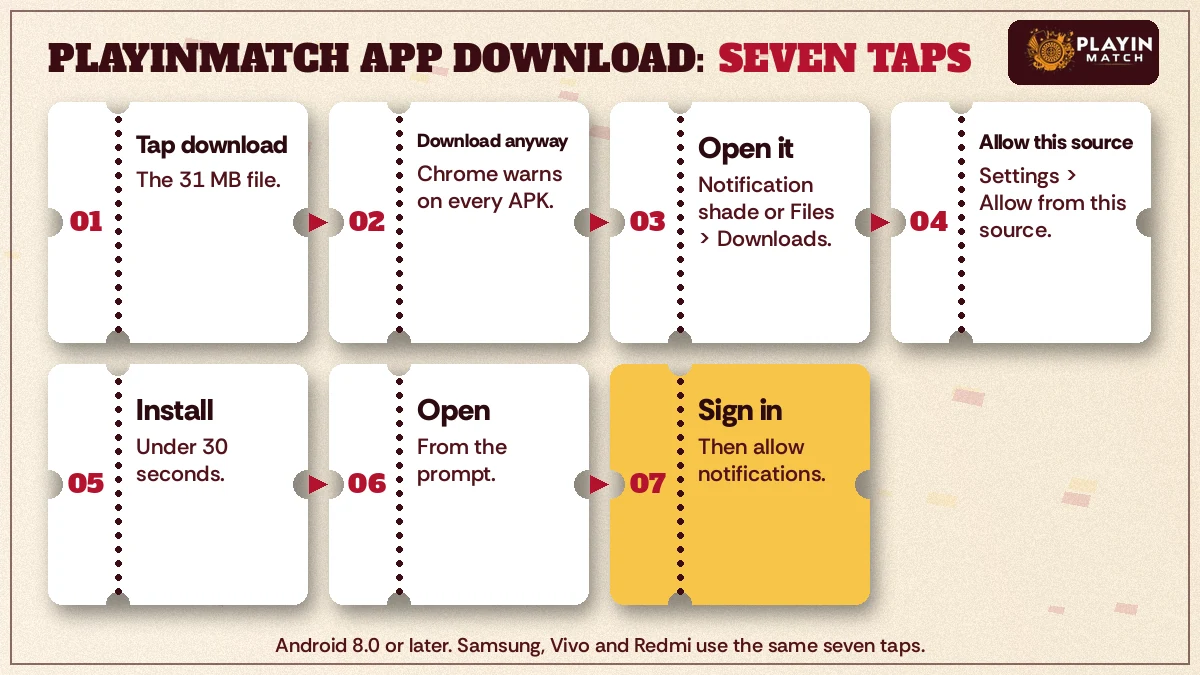
Step four trips up most people. Android grants install permission per app, not per phone, so the switch you flip is specific to Chrome. Downloaded the PlayinMatch file through a different browser, or opened it from WhatsApp? Then that app needs the same permission instead. Nothing about this is permanent; you can turn the switch back off the moment PlayinMatch is installed, and the app keeps working.
No ID yet? The phone part is the easy half. Create the account through joining PlayinMatch on the website first, then come back and install, because the app has no separate registration of its own worth relying on.
Proven PlayinMatch Download Settings on Samsung, Vivo and Redmi Phones
Stock Android asks one question before a sideload. Samsung, Vivo and Xiaomi each add a second gate of their own, and that extra layer is where a PlayinMatch download usually stalls.
Samsung Galaxy: Reliable PlayinMatch APK Install Past Auto Blocker
Newer Galaxy phones on One UI 6 or later may have Auto Blocker switched on, and while it is on, no APK from outside the Galaxy Store or Play Store gets installed. The PlayinMatch file downloads fine, you tap it, and nothing happens except a short notice. Go to Settings, then Security and privacy, then Auto Blocker, and turn it off for the install.
Switch it back on afterwards if you like. PlayinMatch stays installed and updates will ask you to repeat the dance, which is mildly annoying but harmless.
Secure Folder is a separate case. Apps inside it are a second copy with their own storage. If you install the PlayinMatch APK there, you sign in again inside the folder, and alerts arrive only from that copy. Most people are better off installing on the main profile.
Vivo and iQOO: Popular PlayinMatch Download Checks in i Manager
Vivo runs its own scan through i Manager each time an outside package installs. Expect a screen that lists the PlayinMatch app, runs a short check, and asks you to confirm. Some Funtouch and OriginOS builds also ask for the vivo account password before an unknown app goes through; that is the phone guarding the install, not PlayinMatch asking for anything.
If i Manager flags the file as risky, it is flagging it as unknown, which every sideloaded app is. Tap the option to continue installing. Check the file really came from the PlayinMatch link and weighs 31 MB before you do.
Redmi, Xiaomi and POCO: Clear PlayinMatch App Download Past the MIUI Scan
MIUI and HyperOS show the most dramatic warning of the three: a security scan with a countdown timer, sometimes ten seconds, before the Install anyway option unlocks. Let the timer run. Tapping Cancel during the countdown aborts the PlayinMatch install and you start again from Downloads.
A Redmi owner who has done this before will recognise the second trap. Xiaomi phones sometimes require you to be signed into a Mi account before installing from unknown sources at all, and the prompt for that appears only after the the scan. Sign in, or add the account, then reopen the PlayinMatch file.
| Phone | Extra gate | What to do |
|---|---|---|
| Samsung Galaxy | Auto Blocker | Security and privacy, turn it off for the install |
| Vivo, iQOO | i Manager scan, sometimes vivo account password | Continue installing after the scan |
| Redmi, Xiaomi, POCO | MIUI or HyperOS scan with countdown | Wait out the timer, then Install anyway |
Menu names shift a little between software versions. The gates do not.
Why Is the PlayinMatch App Download Not Installing? Proven Fixes
A PlayinMatch APK that refuses to install almost always fails for one of five reasons: an Android version below 8.0, a cut-off download, too little storage, the browser lacking install permission, or a brand security layer blocking the package. Match the message you see to the rows below.
- App not installed. Usually a broken file. Delete the PlayinMatch APK from Downloads, fetch it again on Wi-Fi, and confirm it reads 31 MB.
- There was a problem parsing the package. Almost always an Android version below 8.0, or again a half-finished download. Check About phone first.
- Insufficient storage. Clear space well beyond 31 MB. Old WhatsApp videos are the fastest win on most phones.
- Nothing happens when you tap the file. The browser or file app lacks install permission, or Samsung Auto Blocker is on. See the brand notes above.
- App not installed as package conflicts. An older PlayinMatch build is present and was installed from a different source. Uninstall it, then install the fresh file. Your balance lives on the account, so it survives.
Play Protect may also pop up with a scan request for the PlayinMatch app. Letting it scan is fine. If it recommends not installing, that recommendation is based on the app being unknown to Google, not on anything it found inside.
A typical case: someone on a Redmi taps the PlayinMatch file on a train, the signal drops at 19 MB, and the phone reports a parsing error. They assume the phone is too old. It is not. The file is just short by twelve megabytes, and a second download on home Wi-Fi installs first time.
Still stuck after all five? Restart the phone and try once more (it sounds lazy, but it clears a stuck package installer more often than you would think). Past that, message the PlayinMatch desk with the exact error line and your phone model, which is much faster than describing it.
PlayinMatch App Download iOS: the Reliable Safari Home Screen Icon
There is no PlayinMatch app in the App Store, so an iPhone never downloads a file at all. The iOS route is a home screen icon added from Safari, and it takes under a minute.
- Open the PlayinMatch website in Safari. Chrome on iPhone can add icons on recent iOS versions too, but Safari is the dependable choice.
- With goexch.org.in still loaded in Safari, open the options sheet from the toolbar icon that looks like a tray with an upward arrow.
- Scroll the sheet down and tap Add to Home Screen.
- Keep the name as PlayinMatch or shorten it, then tap Add.
The icon opens PlayinMatch full screen, without the Safari address bar, which is most of what an installed app would give you anyway. Sign in once and Safari remembers the session the way it does for any site.
Two things to expect. Result alerts depend on your iOS version and on whether you allow notifications for the icon, so they are less predictable than on Android. And anyone offering you a PlayinMatch iPhone file, a profile to install, or a TestFlight invite is not offering the real thing; the only iOS method is the one above.
Removing the icon later is just as simple. Press and hold it, choose Remove App, then Delete from Home Screen. Nothing about your PlayinMatch account changes, and you can add the icon again from Safari whenever you want it back. On an iPad the steps are identical, except the Share button sits at the top of the screen beside the adress bar.
For the full breakdown of what the Android app and the iPhone icon each do inside, the PlayinMatch app features page lays them side by side.
Popular PlayinMatch Download Searches People Also Try
- playinmatch app download
- playinmatch download apk
- playinmatch apk file
- playinmatch app download ios
- playinmatch download
- playinmatch app download apk
- playinmatch com mobile download
- playinmatch app kaise download kare
- playinmatch apk install nahi ho raha
- playinmatch iphone app
- playinmatch app login
- playinmatch app update
PlayinMatch App Download Keys in One Clear Fold
Top PlayinMatch Download APK Terms for Android
Whether you search playinmatch app download, playinmatch download apk, or plain playinmatch download, you land on the same 31 MB file for Android 8.0 and newer. The playinmatch app download apk phrasing and the older playinmatch com mobile download both point to that one build; there is no lite version and no second edition to choose between.
- Confirm Android 8.0 or later under About phone.
- Fetch the PlayinMatch file and check it shows 31 MB.
- Allow the browser to install unknown apps, then clear the brand scan.
- Install, open, and sign in with your existing PlayinMatch ID.
Best PlayinMatch App Download iOS Answer
People typing playinmatch app download ios are looking for something that does not exist as a file. The iPhone method is Safari, Share, Add to Home Screen, and the result opens PlayinMatch full screen with your normal sign-in.
- Android
- 31 MB PlayinMatch APK, Android 8.0 or newer
- iPhone
- Safari home screen icon, nothing from the App Store
- Account
- One PlayinMatch ID works on the app, the icon and the website
What the PlayinMatch App Asks For: Clear Permission Requests
A freshly installed PlayinMatch app asks for very little, and each request has a plain reason. Knowing them in advance means you can say yes to the useful ones and no to anything that looks out of place.
- Notifications. Android 13 and later ask this on first launch. PlayinMatch uses it for settled bets, deposit confirmations and payout updates. Declining does not break anything; you simply check the app yourself.
- Storage or install access for updates. When a newer build is ready, the app fetches the update file and hands it to Android to install. That is the only reason it needs to write a file to your phone.
- Install unknown apps, for PlayinMatch itself. Some phones ask for this the first time the app tries to install its own update. Same switch as before, just granted to the app instead of the browser.
What it should not ask for: contacts, SMS, call logs, your location, or accessibility access. PlayinMatch has no use for any of them. If a file claiming to be the PlayinMatch app requsts one of those, uninstall it and fetch the build again from the link on this page, because that is not the 31 MB file described here.
You can review every permission later under Settings, Apps, PlayinMatch, Permissions. Turning notifications off there is instant and reversible.
Keeping the PlayinMatch App Download Current: Reliable Update Routine
Updates install over the top. Your PlayinMatch ID, wallet and bet history sit on the account, not in the app, so a new build never costs you anything but a minute.
Because the file is sideloaded, Play Store will never update PlayinMatch for you. In practice the app itself tells you: a prompt on launch, a tap to fetch the new file, and the same install sheet you saw the first time. Some phones then show their brand scan again; Samsung may need Auto Blocker paused once more, and a Redmi will run its countdown.
Skipped the prompt, or found PlayinMatch closing on launch after an Android system update? The manual route works every time: fetch the current file from this page, tap Install over the copy already on the phone, and the app reopens where you left it.
Only uninstall first if Android reports a package conflict. Uninstalling clears saved sign-in on the phone, so have your password ready or use the PlayinMatch login page to reset it before you start.
Moving the PlayinMatch App Download to a New Phone: Proven Order
New handset? Do not copy the installed app across with a phone-cloning tool. Those transfers sometimes carry the PlayinMatch app without its install record, and the first update then fails with a conflict. Download the 31 MB APK fresh on the new phone instead, run the same seven taps, and sign in. Balance, open bets and history appear as they were, since none of it was stored on the old device.
Want PlayinMatch on a second handset too, perhaps an older Vivo kept at home near the TV? Repeat the install there and sign in with the same ID. Before you sell or pass on a phone, sign out of the app on it first, because the saved session stays with the device until you do.
One habit worth keeping: glance at the update size. A normal PlayinMatch build sits near the 31 MB mark, and something wildly different is a reason to stop and re-download from the official link rather than tap through.
PlayinMatch App Download Questions With Clear Answers
How do I get the PlayinMatch app on my Android phone?
Tap the download button on this page, accept the Chrome file warning, and open the 31 MB PlayinMatch APK from Downloads. Allow Chrome to install unknown apps, tap Install, then sign in with your existing username or phone and password. The whole process usually takes about two minutes.
Can I install PlayinMatch on an iPhone?
Not as a file, because PlayinMatch has no App Store app. Open the website in Safari, tap Share, choose Add to Home Screen and confirm. The icon opens PlayinMatch full screen and keeps you signed in, which covers what most people want from an iPhone app.
Is the PlayinMatch APK safe to install?
Android warns about every file from outside the Play Store, so the warning alone means little. Take the file only from the link on this page, check it shows 31 MB, and make sure the app never asks for contacts, SMS or location. Anything that fails those checks should be deleted.
Why does my phone say the PlayinMatch app is not installed?
Open Files, long-press the PlayinMatch APK in Downloads and read its size. Anything under 31 MB means the transfer broke, so delete it and download again on Wi-Fi. A full-size file that still fails points to Android below 8.0 or a brand security switch blocking it.
How much storage does the PlayinMatch app need?
Budget for the 31 MB PlayinMatch file plus room for the unpacked app. Check Settings, then Storage, before you start. After a successful install you can delete the APK from Downloads and win those 31 MB straight back, since the installed app no longer needs it.
Where do I find the official PlayinMatch download link?
Use the download buttons on this page, which lead to the PlayinMatch booking desk that shares the current Android file. Avoid APKs forwarded in groups or found on mirror sites, since there is no way to confirm those match the 31 MB build.